自定义登录弹窗 / 关闭登录提示框
Authany 移动端 SDK 默认会在 iOS 上使用 ASWebAuthenticationSession、在 Android 上使用 Custom Tabs 来启动 AuthUI。ASWebAuthenticationSession 是 Apple 提供的用于登录的 API,它会存储会话 Cookie 并与 Safari 共享,从而实现移动应用和 Web 应用之间的单点登录(SSO)。
但是,该方式需要获得用户同意,并会显示登录提示框:
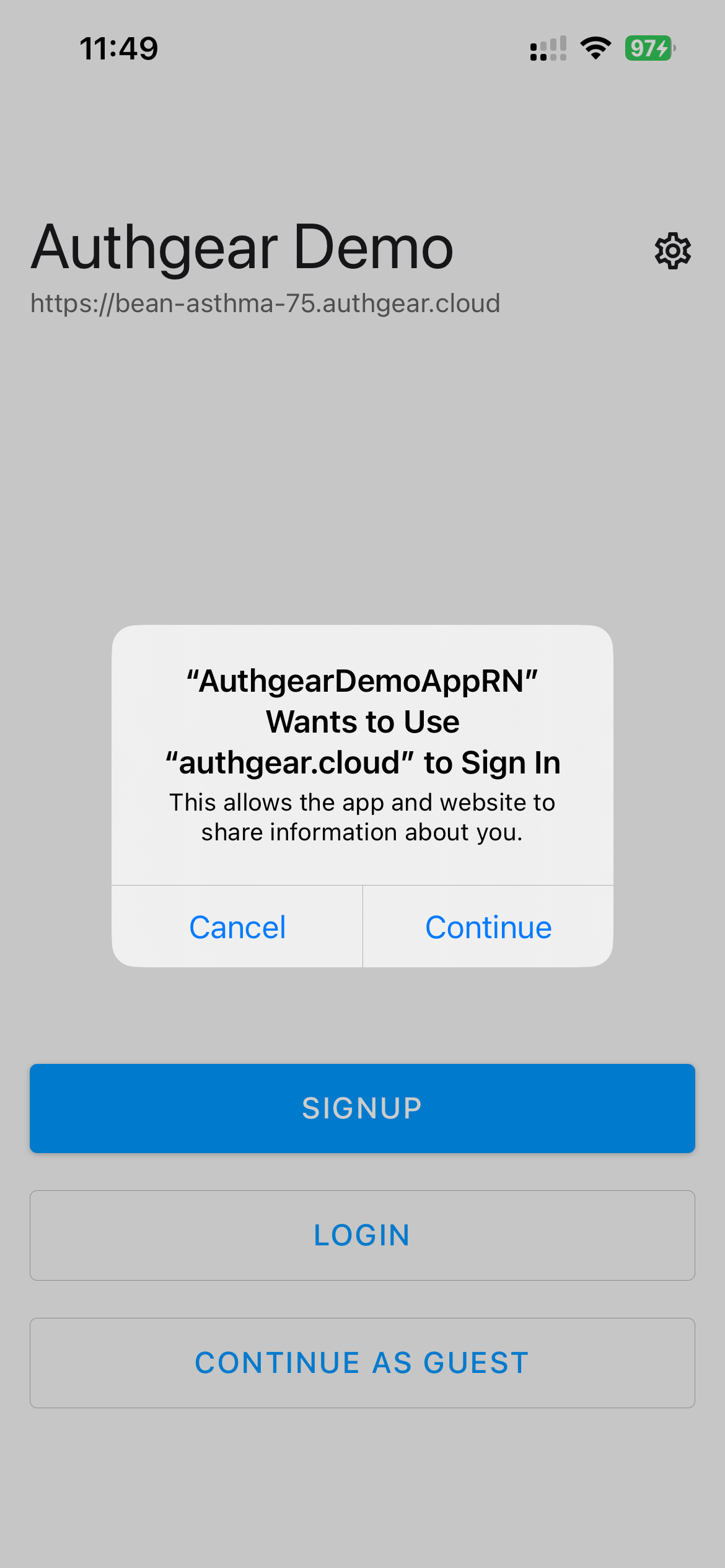
有多种方法可以避免出现登录提示框:
1. 使用临时会话(Ephemeral Sessions)
如果不需要在移动应用和 Web 应用之间实现 SSO,可以通过设置 isSSOEnabled = false 来禁用该功能。
这样一来,应用和 Safari 之间就不会共享会话 Cookie,也不会再显示登录提示框来征求用户同意。
2. 使用 WebKitUIImplementation
移动端 SDK 中包含 WebKitWebViewUIImplementation,这是一种 UIImplementation,可以让您自定义更多界面内容。
根据平台不同,有以下几种可选方案:
- iOS:WKWebViewUIImplementation
- 其他平台 / Android:WebKitWebViewUIImplementation
将 Authany SDK 的 configure() 方法中的 uiImplementation 属性设置为 WebKitWebViewUIImplementation(),即可在 iOS 上使用 WKWebView、在 Android 上使用 android.webkit.WebView 打开 AuthUI。
如果在 configure() 方法中省略 uiImplementation 属性,则会回退到默认行为(使用 ASWebAuthenticationSession/Custom Tabs 启动 AuthUI,即 DeviceBrowserUIImplementation)。
示例代码
以下示例展示了如何设置 uiImplementation 属性。
在上面的示例中,将 uiImplementation 设置为 WebKitWebViewUIImplementation 后,应用的行为会从 iOS 上的 ASWebAuthenticationSession 和 Android 上的 Custom Tabs,分别变为使用 WKWebView 和 android.webkit.WebView。
要在原生 iOS SDK 中将 uiImplementation 设置为 WKWebView,请使用 WKWebViewUIImplementation。
自定义 WebKitWebView 界面
WebKitWebViewUIImplementation 允许您自定义部分界面内容,方法是将自定义选项作为参数传入 WebKitWebViewUIImplementation()。您可以自定义以下界面内容:
Android
actionBarBackgroundColor:使用该选项自定义 WebView Activity 界面上操作栏的颜色。取值应为整数类型,编码方式见:https://developer.android.com/reference/android/graphics/Color#encodingactionBarButtonTintColor:使用该选项设置操作栏上图标和文字的颜色。取值同样应为整数类型,编码方式见:https://developer.android.com/reference/android/graphics/Color#encoding。
iOS
navigationBarBackgroundColor:使用该选项自定义 iOS 上导航栏的颜色。取值类型应为 UIColor,或使用以下编码方式的整数(React Native 或 Ionic SDK):https://developer.android.com/reference/android/graphics/Color#encoding。navigationBarButtonTintColor:该选项用于设置导航栏上图标和文字的颜色。取值同样应为 UIColor,或使用与navigationBarBackgroundColor相同编码方式的整数(React Native 或 Ionic SDK)。modalPresentationStyle:设置要显示的模态类型。取值可以是以下任意一种:"automatic"、"fullScreen"、"pageSheet"。
以下示例展示了如何设置自定义背景色、着色颜色以及模态展示样式。
authgearCapacitor.configure({
  clientID: "<CLIENT_ID>",
  endpoint: "<AUTHGEAR_ENDPOINT>",
  uiImplementation: new WebKitWebViewUIImplementation({
    ios: {
      modalPresentationStyle: "fullScreen"
    },
    android: {
      actionBarBackgroundColor: 0xffffff00,
      actionBarButtonTintColor: 0xff000000
    }
  }),
  tokenStorage: new TransientTokenStorage()
});
private int actionBarBackgroundColor = 0xffffff00;
private int actionBarButtonTintColor = 0xff000000;
private Authgear authgear = new Authgear(
                                getApplication(),
                                "<CLIENT_ID>",
                                "<AUTHGEAR_ENDPOINT>",
                                tokenStorage,
                                new WebKitWebViewUIImplementation(actionBarBackgroundColor, actionBarButtonTintColor),
                                isSsoEnabled,
                                null,
                                app2appOptions
                                );
Authgear(
            clientId: "<CLIENT_ID>",
            endpoint: "<AUTHGEAR_ENDPOINT>",
            tokenStorage: TransientTokenStorage(),
            uiImplementation: WKWebViewUIImplementation(
               modalPresentationStyle: UIModalPresentationStyle.fullScreen,
               navigationBarBackgroundColor: UIColor.yellow,
               navigationBarButtonTintColor: UIColor.black
            ),
            isSSOEnabled: true
        )
3. 实现自定义 UIImplementation
当 WebKitWebViewUIImplementation 无法满足您的使用场景需求时,您可以实现自己的自定义 UIImplementation。
WebKitWebViewUIImplementation 类本质上是一个实现了 UIImplementation 并重写了 openAuthorizationURL() 方法的类。因此,您的自定义实现可能类似下面这样:
class MyUIImplementation implements UIImplementation {
 async openAuthorizationURL(options: OpenAuthorizationURLOptions):
Promise<string> {
 // Call your own plugin code to implement this.
 }
}
然后,您可以像下面这样使用自定义实现:
authgear.configure({
 clientID: "my_client_id",
 endpoint: "my_endpoint",
 isSSOEnabled: true,
 uiImplementation: new MyUIImplementation(),
})
要更深入了解如何实现自己的 UIImplementation,请参见 WebKitWebViewUIImplementation 的实现代码。
不支持的功能
如果放弃默认的 DeviceBrowserUIImplementation,改用基于 WebView 的自定义 UI 实现,需要注意的是,由于 iOS 或其他安全限制,您将失去以下功能。
- 使用 Google 登录: Google 禁止将
WebKitWebView与 Google SSO 一起使用。详见:https://developers.googleblog.com/2021/06/upcoming-security-changes-to-googles-oauth-2.0-authorization-endpoint.html。因此,WebKitWebViewUIImplementation无法与 Google SSO 同时使用。 - 通行密钥(Passkey): WebKitWebView 不支持通行密钥。