Xamarin SDK
本指南将说明如何将 Authany 接入 Xamarin 应用,支持以下包:
- Xamarin.Essentials 1.7.2 或更高版本
- Xamarin.Forms 5.0.0.2401 或更高版本
在 Authany 中设置应用
在 https://manage.authany.com/ 注册一个 Authany 管理台账号,或者使用您的自建部署 Authany。
在项目列表中,新建一个项目或选择一个已有项目。之后,我们需要在项目中创建一个应用。
步骤 1:在管理台中创建应用
- 进入左侧菜单栏中的应用。
- 点击顶部工具栏中的⊕添加应用。
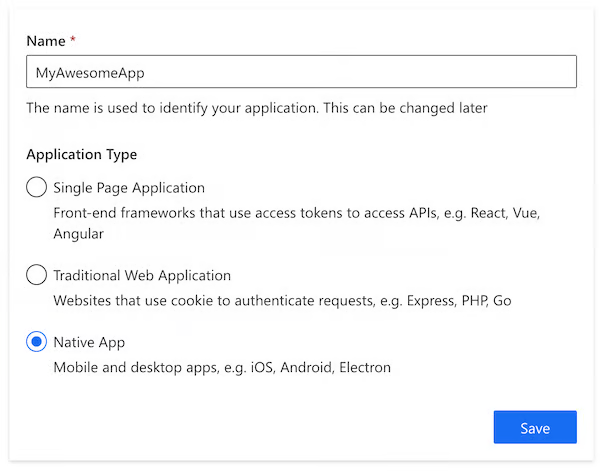
- 输入应用名称,并选择原生应用作为应用类型,点击「保存」。
- 您将看到一系列可帮助您完成设置的指南,然后点击「下一步」。
步骤 2:配置应用
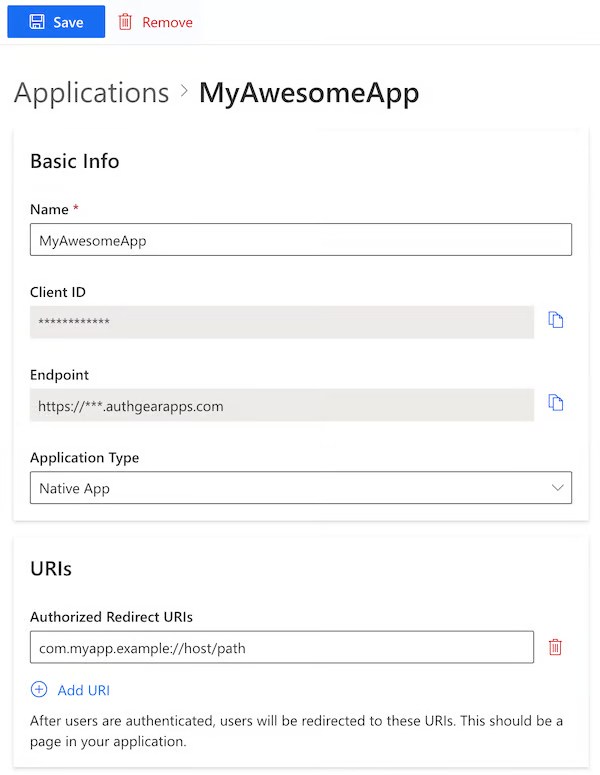
- 在您的 IDE(例如 Visual Studio)中,定义一个自定义 URI scheme,用户完成 Authany 身份验证后将被重定向回该 URI,例如
com.myapp.example://host/path。[^1] - 返回 Authany 管理台,填入您在上一步中定义的重定向 URI。
- 点击顶部工具栏中的「保存」,并记下客户端 ID。之后您也可以在应用列表中重新获取该值。
创建一个 Xamarin 应用
- 打开 Visual Studio
- 新建一个项目
- 选择 Xamarin.Forms 模板
安装 SDK
- 在 nuget.org 上搜索 “Authgear.Xamarin” 并将其添加到您的基础项目中。
https://www.nuget.org/packages/Authgear.Xamarin/ - Authgear.Xamarin 在 Android 上以 MonoAndroid 12.0 为目标,在 iOS 上以 Xamarin.iOS10 为目标。请将 Android 和 iOS 项目的目标框架更新为与 Authgear.Xamarin 的目标框架一致。
- 将 Android 和 iOS 项目的 Xamarin.Essentials 更新到 1.7.2。
平台集成
要完成接入,需要设置应用来处理在应用中指定的 redirectURI。这部分需要针对不同平台进行集成。
Android
定义您自己的回调 Activity
using System;

using Android.App;
using Android.Content.PM;
using Android.Runtime;
using Android.OS;
using Authgear.Xamarin;
using Xamarin.Forms;

namespace MyApp.Droid
{
    [Activity(NoHistory = true, LaunchMode = LaunchMode.SingleTop, Exported = true)]
    [IntentFilter(new[] { Android.Content.Intent.ActionView },
        Categories = new[] { Android.Content.Intent.CategoryDefault, Android.Content.Intent.CategoryBrowsable },
        DataScheme = "com.myapp.example")]
    public class WebAuthenticationCallbackActivity : Xamarin.Essentials.WebAuthenticatorCallbackActivity
    {
    }
}
针对 API level 30 或以上(Android 11 或以上)
如果您的 Android 应用面向 API level 30 或以上(Android 11 或以上),您需要在 AndroidManifest.xml 中添加一个 queries 部分。
<?xml version="1.0" encoding="utf-8"?>
<manifest xmlns:android="http://schemas.android.com/apk/res/android">
  <!-- Other elements such <application> -->
  <queries>
    <intent>
      <action android:name="android.support.customtabs.action.CustomTabsService" />
    </intent>
  </queries>
</manifest>
初始化一个全局 AuthgearSdk 实例
在您的 MainActivity.cs 中
using System;

using Android.App;
using Android.Content.PM;
using Android.Runtime;
using Android.OS;

using Xamarin.Forms;
using Authgear.Xamarin;

namespace MyApp.Droid
{
    public class MainActivity : global::Xamarin.Forms.Platform.Android.FormsAppCompatActivity
    {
        protected override void OnCreate(Bundle savedInstanceState)
        {
            // ...

            var authgear = new AuthgearSdk(this, new AuthgearOptions
            {
                ClientId = CLIENT_ID,
                AuthgearEndpoint = ENDPOINT
            });
            DependencyService.RegisterSingleton<AuthgearSdk>(authgear);
            LoadApplication(new App());

            // ...
        }

        // other methods are omitted for brevity.
    }
}
iOS
在您的 iOS 项目 Info.plist 中添加以下键值对
<?xml version="1.0" encoding="UTF-8"?>
<!DOCTYPE plist PUBLIC "-//Apple//DTD PLIST 1.0//EN" "http://www.apple.com/DTDs/PropertyList-1.0.dtd">
<plist version="1.0">
<dict>
        <!-- other entries ... -->
        <key>CFBundleURLTypes</key>
        <array>
          <dict>
            <key>CFBundleURLName</key>
            <string>com.myapp.example://host/path</string>

            <key>CFBundleURLSchemes</key>
            <array>
              <string>com.myapp.example</string>
            </array>

            <key>CFBundleTypeRole</key>
            <string>Editor</string>
          </dict>
        </array>
</dict>
</plist>
初始化一个全局 AuthgearSdk 实例
在您的 AppDelegate.cs 中
using Xamarin.Essentials;
using Xamarin.Forms;
using Authgear.Xamarin;

namespace MyApp.iOS
{
    [Register("AppDelegate")]
    public partial class AppDelegate : global::Xamarin.Forms.Platform.iOS.FormsApplicationDelegate
    {
        public override bool FinishedLaunching(UIApplication app, NSDictionary options)
        {
            global::Xamarin.Forms.Forms.Init();
            var authgear = new AuthgearSdk(app, new AuthgearOptions
            {
                ClientId = CLIENT_ID,
                AuthgearEndpoint = ENDPOINT
            });
            DependencyService.RegisterSingleton<AuthgearSdk>(authgear);
            LoadApplication(new App());

            return base.FinishedLaunching(app, options);
        }

        public override bool OpenUrl(UIApplication app, NSUrl url, NSDictionary options)
        {
            return Xamarin.Essentials.Platform.OpenUrl(app, url, options);
        }

        public override bool ContinueUserActivity(UIApplication application, NSUserActivity userActivity, UIApplicationRestorationHandler completionHandler)
        {
            if (Xamarin.Essentials.Platform.ContinueUserActivity(application, userActivity, completionHandler))
                return true;
            return base.ContinueUserActivity(application, userActivity, completionHandler);
        }
    }
}
尝试身份验证
编辑您的 MainPage.xaml
<?xml version="1.0" encoding="utf-8" ?>
<ContentPage xmlns="http://xamarin.com/schemas/2014/forms"
             xmlns:x="http://schemas.microsoft.com/winfx/2009/xaml"
             x:Class="testauthgear.MainPage">

    <StackLayout>
        <Frame BackgroundColor="#2196F3" Padding="24" CornerRadius="0">
            <Label Text="Welcome to Xamarin.Forms!" HorizontalTextAlignment="Center" TextColor="White" FontSize="36"/>
        </Frame>
        <Button Text="Configure" Clicked="Configure_Clicked" />
        <Button Text="Authenticate" Clicked="Authenticate_Clicked"/>
    </StackLayout>

</ContentPage>
编辑您的 MainPage.xaml.cs
using System;
using System.Collections.Generic;
using System.ComponentModel;
using System.Linq;
using System.Text;
using System.Threading.Tasks;
using Xamarin.Forms;
using Authgear.Xamarin;

namespace MyApp
{
    public partial class MainPage : ContentPage
    {
        private AuthgearSdk authgear;

        public MainPage()
        {
            InitializeComponent();
            authgear = DependencyService.Get<AuthgearSdk>();
        }

        async void Configure_Clicked(object sender, EventArgs e)
        {
            // You must configure the instance before use.
            // Typically you should do this once on app launch.
            await authgear.ConfigureAsync();
        }

        async void Authenticate_Clicked(object sender, EventArgs e)
        {
            var userInfo = await authgear.AuthenticateAsync(new AuthenticateOptions
            {
                RedirectUri = REDIRECT_URI
            });
        }
    }
}
获取登录状态
在启动应用时,您可能希望知道用户是否已经登录(例如,如果用户尚未登录,向其显示登录页面)。SessionState 反映的是 SDK 在设备本地记录的用户登录状态。也就是说,即使 SessionState 为 Authenticated,如果会话已在远端被撤销,该会话也可能是无效的。初始化 Authany SDK 后,在适当的时机调用 FetchUserInfoAsync 来更新 SessionState。
// value can be NoSession or Authenticated
// After Authgear.ConfigureAsync, it only reflects local state.
var sessionState = authgear.SessionState;

if (sessionState == SessionState.Authenticated)
{
    try
    {
        var userInfo = await authgear.FetchUserInfoAsync();
        // sessionState is now up to date
    }
    catch (Exception ex)
    {
        // sessionState is now up to date
        // it will change to NoSession if the session is invalid
    }
}
SessionState 的值可以是 Unknown、NoSession 或 Authenticated。初始时,SessionState 为 Unknown。调用 authgear.configure 后,如果找到了之前的会话,SessionState 将变为 Authenticated;如果没有找到这样的会话,则变为 NoSession。
获取用户信息
在某些情况下,您可能需要通过 SDK 获取当前用户信息(例如,在 UI 中显示邮箱地址)。使用 FetchUserInfoAsync 函数获取用户信息,参见示例。
登出
要将用户从当前应用会话登出,您需要调用logout函数。
调用 API
要在发往应用服务器的 HTTP 请求中携带访问令牌,您需要使用 authgear.AccessToken 手动设置 bearer token。
使用 HttpClient
您可以通过 authgear.AccessToken 获取访问令牌。每次使用访问令牌之前都调用一次 RefreshAccessTokenIfNeededAsync,该函数只有在访问令牌已过期时才会检查并发起网络请求。然后,将访问令牌加入 HTTP 请求的 Authorization 请求头中。
await authgear.RefreshAccessTokenIfNeededAsync();
// Access token is ready to use
// AccessToken can be string or undefined
// It will be empty if user is not logged in or session is invalid
var accessToken = authgear.AccessToken;
var client = GetHttpClient();  // Get the re-used http client of your app, as per recommendation.
var httpRequestMessage = new HttpRequestMessage(myHttpMethod, myUrl);
httpRequestMessage.Headers.Authorization = new AuthenticationHeaderValue("Bearer", accessToken);
后续步骤
要保护您的应用服务器免受未经授权的访问,您需要将后端与 Authany 集成。
Xamarin SDK 参考
有关 Xamarin SDK 的详细文档,请访问 Xamarin SDK Reference
脚注
[^1]: 关于在 Xamarin 中设置自定义 URI scheme 的更多说明,参见 https://www.xamarinhelp.com/uri-scheme/ [^2]: 关于 JWT 的更多说明,参见 https://en.wikipedia.org/wiki/JSON_Web_Token