添加生物识别登录
概述
说明
生物识别登录支持以下操作系统:
- iOS 11.3 或更高版本
- Android 6.0(API 23)或更高版本
Authany 支持在原生移动应用中启用生物识别登录。您需要:
- 通过管理台在应用中启用生物识别登录。
- 在移动应用中使用移动端 SDK 为用户启用生物识别登录。
注册生物识别登录时会生成一对密钥。私钥会安全地存储在设备中(Android 使用 Keystore,iOS 使用 Keychain),公钥则存储在 Authany 服务器上。验证用户身份时,用户通过指纹或人脸解锁私钥,随后将经过数字签名的消息发送到服务器,以证明用户身份的真实性。
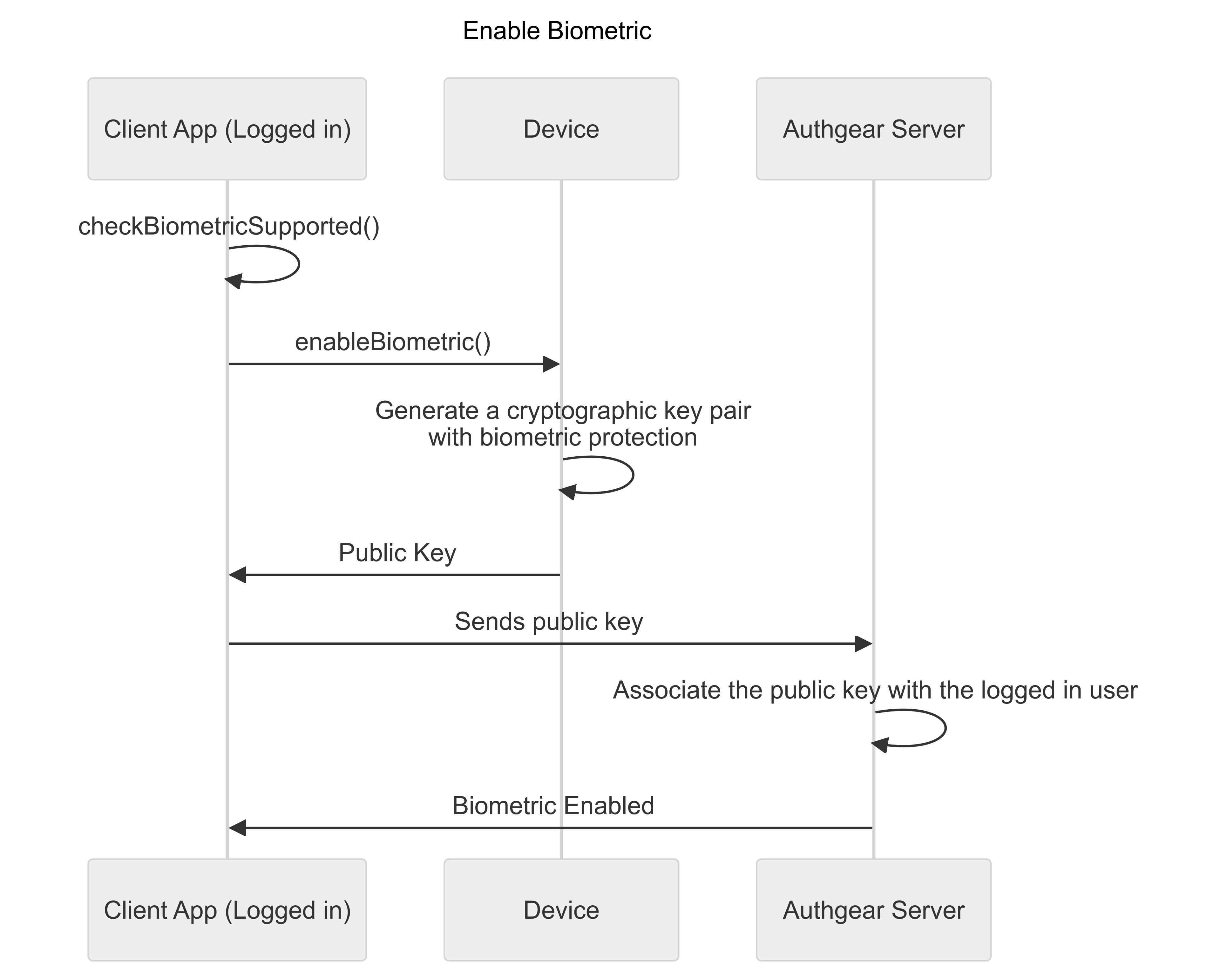
图 1.0 下图展示了在受支持设备上启用生物识别登录的流程:
启用生物识别登录
已登录用户账号的客户端应用会检查用户设备是否支持生物识别。如果设备支持生物识别登录,就会启用该功能。随后,公钥会被发送到 Authany 服务器,并与已登录用户的账号关联。
流程完成后,该用户就在客户端应用上启用了生物识别登录。
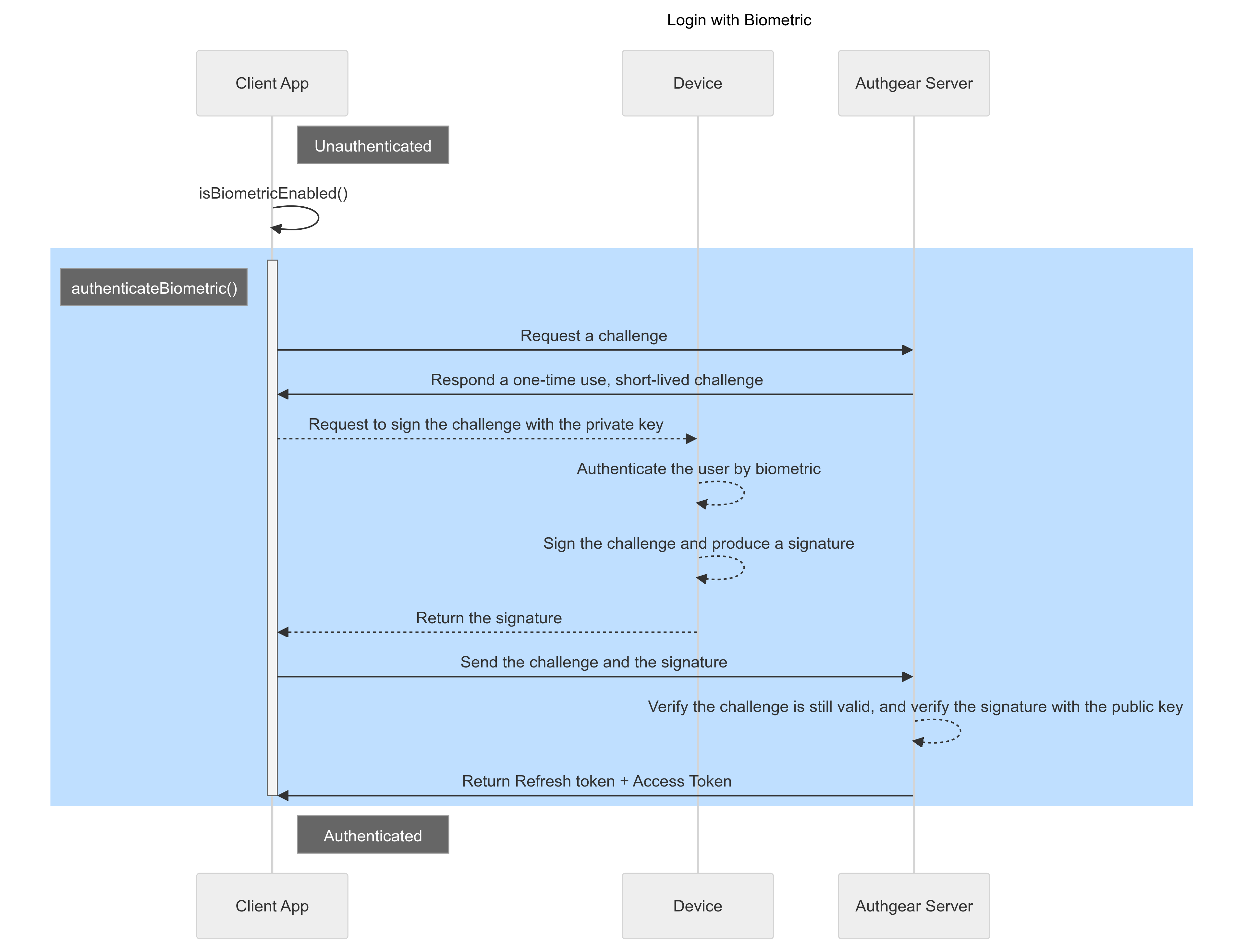
图 2.0 下图展示了用户使用生物识别登录的流程:
使用生物识别登录
用户启用生物识别登录后,下次需要登录时即可发起生物识别验证流程,具体步骤如上图 2.0 所示。生物识别登录成功后,Authany 服务器会返回访问令牌和刷新令牌,客户端应用即可使用访问令牌发起已验证的请求。
听起来很复杂?这些都由 Authany 为您自动处理。请按照本指南,只需几行代码即可在应用中启用生物识别登录。
为项目启用生物识别验证
- 在管理台中,进入 身份验证 > 生物识别。
- 打开 启用生物识别验证。
- 保存 设置。
为客户端应用设置合理的短令牌有效期
生物识别登录通常用在需要让用户在较短时间后重新登录的场景。对于金融类等敏感应用,建议 使用较短的刷新令牌有效期和较短的空闲超时时间。
- 在 Authany 管理台中,进入 应用
- 选择代表移动应用集成的客户端应用
- 将 刷新令牌有效期 设置为较短时间,例如 3,600 秒(1 小时)
- 启用 空闲后过期
- 将 空闲超时时间 设置为较短时间,例如 1,800 秒(30 分钟)
这样设置后,终端用户的会话会在登录 1 小时后过期,或在闲置 30 分钟后过期。即使应用进程尚未被终止,终端用户也需要重新通过生物识别进行身份验证。
配置 SDK,使应用关闭后用户必须重新登录
除了设置较短的令牌有效期之外,敏感应用通常还会要求用户在应用进程被终止并重新启动后,通过生物识别重新登录。
应将 SDK 配置为使用 TransientTokenStorage,使令牌存储在内存中,应用关闭后会被清除,因此终端用户必须再次通过生物识别进行身份验证。
public class MyAwesomeApplication extends Application {
    // The client ID of the oauth client.
    private static final String CLIENT_ID = "a_random_generated_string"
    // Deployed authgear's endpoint
    private static final String AUTHGEAR_ENDPOINT = "http://<myapp>.authgear.cloud/"
    private Authgear mAuthgear;
    public void onCreate() {
        super.onCreate();
        mAuthgear = new Authgear(this, CLIENT_ID, AUTHGEAR_ENDPOINT, new TransientTokenStorage());
        mAuthgear.configure(new OnConfigureListener() {
            @Override
            public void onConfigured() {
                // Authgear can be used.
            }

            @Override
            public void onConfigurationFailed(@NonNull Throwable throwable) {
                Log.d(TAG, throwable.toString());
                // Something went wrong, check the client ID or endpoint.
            }
        });
    }

    public Authgear getAuthgear() {
        return mAuthgear;
    }
}
import React, { useCallback } from "react";
import { View, Button } from "react-native";
import authgear, { TransientTokenStorage } from "@authgear/react-native";

function LoginScreen() {
  const onPress = useCallback(() => {
    // Normally you should only configure once when the app launches.
    authgear
      .configure({
        clientID: "client_id",
        endpoint: "http://<myapp>.authgear.cloud",
        tokenStorage: new TransientTokenStorage()
      })
      .then(() => {
        authgear
          .authenticate({
            redirectURI: "com.myapp.example://host/path",
          })
          .then(({ userInfo }) => {
            console.log(userInfo);
          });
      });
  }, []);

  return (
    <View>
      <Button onPress={onPress} title="Authenticate" />
    </View>
  );
}
import authgearCapacitor, { TransientTokenStorage, CancelError as CapacitorCancelError } from "@authgear/capacitor";
import authgearWeb, { SessionState, UserInfo, CancelError as WebCancelError } from "@authgear/web";
import { Capacitor } from "@capacitor/core";
import { useCallback, useState } from "react";

function isPlatformWeb(): boolean {
    return Capacitor.getPlatform() === "web";
}

const CLIENT_ID = "client_id";
const ENDPOINT = "http://<myapp>.authgear.cloud";

function AuthenticationScreen() {

    const [isAlertOpen, setIsAlertOpen] = useState(false);
    const [alertHeader, setAlertHeader] = useState("");
    const [alertMessage, setAlertMessage] = useState("");
    const [loading, setLoading] = useState(false);
    const [initialized, setInitialized] = useState(false);

    const [sessionState, setSessionState] = useState<SessionState | null>(() => {
        if (isPlatformWeb()) {
            return authgearWeb.sessionState;
        }
        return authgearCapacitor.sessionState;
    });

    const showError = useCallback((e: any) => {
        const json = JSON.parse(JSON.stringify(e));
        json["constructor.name"] = e?.constructor?.name;
        json["message"] = e?.message;
        let message = JSON.stringify(json);

        if (e instanceof WebCancelError || e instanceof CapacitorCancelError) {
            // Cancel is not an error actually.
            return;
        }

        setIsAlertOpen(true);
        setAlertHeader("Error");
        setAlertMessage(message);
    }, []);

    const postConfigure = useCallback(async () => {
        const sessionState = isPlatformWeb()
            ? authgearWeb.sessionState
            : authgearCapacitor.sessionState;
        if (sessionState !== "AUTHENTICATED") {
            setInitialized(true);
            return;
        }

        if (isPlatformWeb()) {
            await authgearWeb.fetchUserInfo();
        } else {
            await authgearCapacitor.fetchUserInfo();
        }

        setInitialized(true);
    }, []);

    const configure = useCallback(async () => {
        setLoading(true);
        try {

            if (isPlatformWeb()) {
                await authgearWeb.configure({
                    clientID: CLIENT_ID,
                    endpoint: ENDPOINT,
                    sessionType: "refresh_token",
                    isSSOEnabled: false,
                });
            } else {
                await authgearCapacitor.configure({
                    clientID: CLIENT_ID,
                    endpoint: ENDPOINT,
                    tokenStorage: new TransientTokenStorage()
                });

            }
            await postConfigure();
        } catch (e) {
            showError(e);
        } finally {
            setLoading(false);
        }
    }, [
        CLIENT_ID,
        ENDPOINT
    ]);
}
在移动端 SDK 中启用生物识别登录
以下部分将展示如何在 SDK 中使用生物识别登录。在 SDK 代码示例中,authgear 指的是已配置好的 Authany 容器实例。
生物识别选项
自定义生物识别选项,以达到预期的用户体验。
iOS
iOS 上有 4 个选项:
localizedReason是向用户说明为什么需要使用 TouchID 或 FaceID 的自定义消息。localizedCancelTitle(可选)用于自定义取消按钮的文字。policy用于约束用户在本地进行身份验证的方式。deviceOwnerAuthenticationWithBiometrics:用户必须使用 TouchID 或 FaceID,这也意味着设备必须已经设置好 TouchID 或 FaceID。另请参阅错误处理deviceOwnerAuthentication:如果设备已设置 TouchID 或 FaceID,会优先使用;否则会使用设备密码,这也意味着设备必须已设置密码。另请参阅错误处理- 该选项对应 iOS 上的
LAPolicy枚举,参见 Apple 开发者文档中关于这些选项的说明。 constraint是一个枚举,用于约束在不同条件下访问所存储密钥的方式:biometryCurrentSet:如果设备的 TouchID 或 FaceID 发生任何变化,生物识别登录将失效。变化包括添加、删除或重新录入任意指纹或面容。biometryAny:即使设备的 TouchID 或 FaceID 发生变化,生物识别登录仍然有效。userPresence:可以使用生物识别或设备密码/PIN 访问私钥。- 参见 Apple 开发者文档中关于这些选项的说明。
综上所述,请根据期望的行为和业务需求,按下表设置 policy 和 constraint 选项。
| 需求 | Policy | Constraint |
|---|---|---|
| 使用当前已设置的任意生物特征登录,重新录入会导致失效。 | deviceOwnerAuthenticationWithBiometrics | BiometryCurrentSet |
| 使用任意生物特征登录,重新录入不会导致失效。 | deviceOwnerAuthenticationWithBiometrics | biometryAny |
| 使用生物识别或设备密码登录 | deviceOwnerAuthentication | userPresence |
Android
Android 上有 6 个选项:
title是展示给用户的生物识别对话框的标题subtitle是展示给用户的生物识别对话框的副标题description是展示给用户的生物识别对话框的说明文字negativeButtonText是生物识别对话框中关闭按钮上显示的文字allowedAuthenticatorsOnEnable是一个数组,用于定义用户启用生物识别时所需的安全级别,取值可以是BIOMETRIC_STRONG或DEVICE_CREDENTIAL。allowedAuthenticatosOnAuthenticate是一个数组,用于定义用户使用生物识别进行身份验证时所需的安全级别。invalidatedByBiometricEnrollment是一个布尔值,用于控制在录入新的生物特征或删除所有已有生物特征时,密钥对是否会失效。
综上所述,请根据期望的行为和业务需求,按下表设置 allowedAuthenticatorsOnEnable 和 allowedAuthenticatosOnAuthenticate。
| 需求 | allowedAuthenticatorsOnEnable |
allowedAuthenticatosOnAuthenticate |
|---|---|---|
| 启用及后续生物识别验证时均需要生物识别。 | [BIOMETRIC_STRONG] |
[BIOMETRIC_STRONG] |
| 启用时需要生物识别,后续生物识别验证时也允许使用密码。 | [BIOMETRIC_STRONG] |
[BIOMETRIC_STRONG, DEVICE_CREDENTIAL] |
| 启用及后续生物识别验证时均允许使用密码。 | [BIOMETRIC_STRONG, DEVICE_CREDENTIAL] |
[BIOMETRIC_STRONG, DEVICE_CREDENTIAL] |
代码示例
检查是否支持
在调用任何生物识别 API 之前,请务必先检查当前设备是否支持生物识别登录,包括在启用生物识别登录之前和使用生物识别登录之前。
boolean supported = false;
try {
    // biometric login is supported SDK_INT >= 23 (Marshmallow)
    if (Build.VERSION.SDK_INT >= 23) {
        // check if current device supports biometric login
        authgear.checkBiometricSupported(
                this.getApplication(),
                List.of(BiometricAuthenticator.BIOMETRIC_STRONG)
        );
        supported = true;
    }
} catch (Exception e) {}
if (supported) {
    // biometric login is supported
}
const biometricOptions = {
  ios: {
    localizedReason: 'Use biometric to authenticate',
    localizedCancelTitle: 'Cancel',
    constraint: BiometricAccessConstraintIOS.BiometryCurrentSet,
    policy: BiometricLAPolicy.deviceOwnerAuthenticationWithBiometrics,
  },
  android: {
    title: 'Biometric Authentication',
    subtitle: 'Biometric authentication',
    description: 'Use biometric to authenticate',
    negativeButtonText: 'Cancel',
    allowedAuthenticatorsOnEnable: [BiometricAuthenticatorAndroid.BiometricStrong],
    allowedAuthenticatosOnAuthenticate: [BiometricAuthenticatorAndroid.BiometricStrong],
    invalidatedByBiometricEnrollment: true,
  },
};
// check if current device supports biometric login
authgear
    .checkBiometricSupported(biometricOptions)
    .then(() => {
        // biometric login is supported
    })
    .catch(() => {
        // biometric login is not supported
    });
// We will need the options for the other biometric api
final ios = BiometricOptionsIOS(
    localizedReason: "Use biometric to authenticate",
    localizedCancelTitle: "Cancel",
    constraint: BiometricAccessConstraintIOS.biometryAny,
    policy: BiometricLAPolicy.deviceOwnerAuthenticationWithBiometrics,
);
final android = BiometricOptionsAndroid(
    title: "Biometric Authentication",
    subtitle: "Biometric authentication",
    description: "Use biometric to authenticate",
    negativeButtonText: "Cancel",
    allowedAuthenticatorsOnEnable: [BiometricAuthenticatorAndroid.biometricStrong],
    allowedAuthenticatorsOnAuthenticate: [BiometricAuthenticatorAndroid.biometricStrong],
    invalidatedByBiometricEnrollment: true,
);

try {
    // check if current device supports biometric login
    await authgear.checkBiometricSupported(ios: ios, android: android);
    // biometric login is supported
} catch (e) {
    // biometric login is not supported
}
const biometricOptions: BiometricOptions = {
  ios: {
    localizedReason: "Use biometric to authenticate",
    localizedCancelTitle: "Cancel",
    constraint: BiometricAccessConstraintIOS.BiometryCurrentSet,
    policy: BiometricLAPolicy.deviceOwnerAuthenticationWithBiometrics,
  },
  android: {
    title: "Biometric Authentication",
    subtitle: "Biometric authentication",
    description: "Use biometric to authenticate",
    negativeButtonText: "Cancel",
    allowedAuthenticatorsOnEnable: [BiometricAuthenticatorAndroid.BiometricStrong],
    allowedAuthenticatosOnAuthenticate: [BiometricAuthenticatorAndroid.BiometricStrong],
    invalidatedByBiometricEnrollment: true,
  },
};

const updateBiometricState = useCallback(async () => {
    if (isPlatformWeb()) {
      return;
    }

    try {
      await authgearCapacitor.checkBiometricSupported(biometricOptions);
     //enable biometric...
    } catch (e) {
      console.error(e);
    }
  }, []);
启用生物识别登录
为已登录用户启用生物识别登录
// provide localizedReason for requesting authentication
// which displays in the authentication dialog presented to the user
authgear.enableBiometric(
    localizedReason: "REPLACE_WITH_LOCALIZED_REASON",
    constraint: .biometryCurrentSet,
    policy: .deviceOwnerAuthenticationWithBiometrics,
    localizedCancelTitle: "Cancel",
) { result in
    if case let .failure(error) = result {
        // failed to enable biometric with error
    } else {
        // enabled biometric successfully
    }
}
// We will need the options for the other biometric api
BiometricOptions biometricOptions = new BiometricOptions(
    activity, // FragmentActivity
    "Biometric authentication", // title
    "Biometric authentication", // subtitle
    "Use biometric to authenticate", // description
    "Cancel", // negativeButtonText
    List.of(BiometricAuthenticator.BIOMETRIC_STRONG), // allowedAuthenticatorsOnEnable
    List.of(BiometricAuthenticator.BIOMETRIC_STRONG), // allowedAuthenticatorsOnAuthenticate
    true // invalidatedByBiometricEnrollment
);
authgear.enableBiometric(
    biometricOptions,
    new OnEnableBiometricListener() {
        @Override
        public void onEnabled() {
            // enabled biometric login successfully
        }

        @Override
        public void onFailed(Throwable throwable) {
            // failed to enable biometric with error
        }
    }
);
const enableBiometric = useCallback(async () => {
  setLoading(true);
  try {
    await authgearCapacitor.enableBiometric(biometricOptions);
  } catch (e: unknown) {
    showError(e);
  } finally {
    setLoading(false);
    await updateBiometricState();
  }
}, [showError, updateBiometricState]);

const onClickEnableBiometric = useCallback(
  (e: MouseEvent<HTMLIonButtonElement>) => {
    e.preventDefault();
    e.stopPropagation();

    enableBiometric();
  },
  [enableBiometric]
);
检查生物识别是否已启用
在要求用户使用生物识别登录之前,请先检查当前设备是否已启用生物识别登录,即检查设备上是否存在密钥对(Android 上为 Keystore,iOS 上为 Keychain)。
即使设备上的所有指纹和面容数据都已被删除,该方法仍可能返回 true。在调用此方法之前,应先使用 "checkBiometricSupported" 检查设备层面是否支持生物识别。
使用生物识别凭据登录
如果设备支持并且已启用生物识别,您可以使用 Authenticate Biometric 方法让用户登录。如果因生物识别设置发生变化(例如添加了新指纹或重新录入了面容数据)导致密钥对失效,将会抛出 biometricPrivateKeyNotFound 错误。此时应通过 Disable Biometric 方法处理该错误,并要求用户重新注册生物识别登录。
const showUserInfo = useCallback((userInfo: UserInfo) => {
const message = JSON.stringify(userInfo, null, 2);
setIsAlertOpen(true);
setAlertHeader("UserInfo");
setAlertMessage(message);
}, []);
const authenticateBiometric = useCallback(async () => {
setLoading(true);
try {
const { userInfo } = await authgearCapacitor.authenticateBiometric(
biometricOptions
);
showUserInfo(userInfo);
} catch (e: unknown) {
showError(e);
} finally {
setLoading(false);
await updateBiometricState();
}
}, [showError, showUserInfo, updateBiometricState]);
在当前设备上禁用生物识别登录
错误处理
在所有与生物识别相关的方法中,SDK 都可能抛出以下错误,用于描述生物识别录入状态或设备上存储的密钥对状态。
if let authgearError = error as? AuthgearError {
switch authgearError {
case .cancel:
// user cancel
case .biometricPrivateKeyNotFound:
// biometric info has changed. e.g. Touch ID or Face ID has changed.
// user have to set up biometric authentication again
case .biometricNotSupportedOrPermissionDenied:
// user has denied the permission of using Face ID
case .biometricNoPasscode:
// device does not have passcode set up
case .biometricNoEnrollment:
// device does not have Face ID or Touch ID set up
case .biometricLockout:
// the biometric is locked out due to too many failed attempts
default:
// other error
// you may consider showing a generic error message to the user
}
}
import com.oursky.authgear.BiometricLockoutException;
import com.oursky.authgear.BiometricNoEnrollmentException;
import com.oursky.authgear.BiometricNoPasscodeException;
import com.oursky.authgear.BiometricNotSupportedOrPermissionDeniedException;
import com.oursky.authgear.BiometricPrivateKeyNotFoundException;
import com.oursky.authgear.CancelException;
if (e instanceof CancelException) {
// user cancel
} else if (e instanceof BiometricPrivateKeyNotFoundException) {
// biometric info has changed
// user have to set up biometric authentication again
} else if (e instanceof BiometricNoEnrollmentException) {
// device does not have biometric set up
} else if (e instanceof BiometricNotSupportedOrPermissionDeniedException) {
// biometric is not supported in the current device
// or user has denied the permission of using biometric
} else if (e instanceof BiometricNoPasscodeException) {
// device does not have unlock credential set up
} else if (e instanceof BiometricLockoutException) {
// the biometric is locked out due to too many failed attempts
} else {
// other error
// you may consider showing a generic error message to the user
}
import {
CancelError,
BiometricPrivateKeyNotFoundError,
BiometricNotSupportedOrPermissionDeniedError,
BiometricNoEnrollmentError,
BiometricNoPasscodeError,
BiometricLockoutError,
} from '@authgear/react-native'
if (e instanceof CancelError) {
// user cancel
} else if (e instanceof BiometricPrivateKeyNotFoundError) {
// biometric info has changed. e.g. Touch ID or Face ID has changed.
// user have to set up biometric authentication again
} else if (e instanceof BiometricNoEnrollmentError) {
// device does not have biometric set up
// e.g. have not set up Face ID or Touch ID in the device
} else if (e instanceof BiometricNotSupportedOrPermissionDeniedError) {
// biometric is not supported in the current device
// or user has denied the permission of using Face ID
} else if (e instanceof BiometricNoPasscodeError) {
// device does not have unlock credential or passcode set up
} else if (e instanceof BiometricLockoutError) {
// the biometric is locked out due to too many failed attempts
} else {
// other error
// you may consider showing a generic error message to the user
}
try {
// ...
} on CancelException catch (e) {
// user cancel
} on BiometricPrivateKeyNotFoundException catch (e) {
// biometric info has changed. e.g. Touch ID or Face ID has changed.
// user have to set up biometric authentication again
} on BiometricNoEnrollmentException catch (e) {
// device does not have biometric set up
// e.g. have not set up Face ID or Touch ID in the device
} on BiometricNotSupportedOrPermissionDeniedException catch (e) {
// biometric is not supported in the current device
// or user has denied the permission of using Face ID
} on BiometricNoPasscodeException catch (e) {
// device does not have unlock credential or passcode set up
} on BiometricLockoutException catch (e) {
// the biometric is locked out due to too many failed attempts
} catch (e) {
// other error
// you may consider showing a generic error message to the user
}
import {
CancelError,
BiometricPrivateKeyNotFoundError,
BiometricNotSupportedOrPermissionDeniedError,
BiometricNoEnrollmentError,
BiometricNoPasscodeError,
BiometricLockoutError,
} from '@authgear/capacitor'
if (e instanceof CancelError) {
// user cancel
} else if (e instanceof BiometricPrivateKeyNotFoundError) {
// biometric info has changed. e.g. Touch ID or Face ID has changed.
// user have to set up biometric authentication again
} else if (e instanceof BiometricNoEnrollmentError) {
// device does not have biometric set up
// e.g. have not set up Face ID or Touch ID in the device
} else if (e instanceof BiometricNotSupportedOrPermissionDeniedError) {
// biometric is not supported in the current device
// or user has denied the permission of using Face ID
} else if (e instanceof BiometricNoPasscodeError) {
// device does not have unlock credential or passcode set up
} else if (e instanceof BiometricLockoutError) {
// the biometric is locked out due to too many failed attempts
} else {
// other error
// you may consider showing a generic error message to the user
}
生物识别验证失败时回退到设备 PIN/密码
当用户设备上的生物识别验证失败时,您可能希望为用户提供其他登录方式。例如,当用户的手指不干净(触控式)或人脸被遮挡(Face ID)时。
在 iOS 上,启用时使用 deviceOwnerAuthenticationWithBiometrics,后续验证时使用 deviceOwnerAuthentication。
在 Android 上,请按照下面的示例设置 allowedAuthenticatorsOnEnable 和 allowedAuthenticatosOnAuthenticate。
// Enable biometric for the user.
authgear.enableBiometric(
localizedReason: "The reason",
constraint: .biometryCurrentSet,
// The user must authenticate with biometric during enable.
policy: .deviceOwnerAuthenticationWithBiometrics,
) { result in
if case let .failure(error) = result {
// Handle error
} else {
// Enabled successfully
}
}
// Authenticate the user
authgear.authenticateBiometric(
localizedReason: "The reason",
// Allow passcode by using deviceOwnerAuthentication instead of deviceOwnerAuthenticationWithBiometrics
policy: .deviceOwnerAuthentication
) { result in
if case let .failure(error) = result {
// Handle error
} else {
// Authenticated successfully, either with biometric or passcode.
}
}
BiometricOptions biometricOptions = new BiometricOptions(
activity, // FragmentActivity
"Biometric authentication", // title
"Biometric authentication", // subtitle
"Use biometric to authenticate", // description
"Cancel", // negativeButtonText
// Require biometric during enable
List.of(BiometricAuthenticator.BIOMETRIC_STRONG), // allowedAuthenticatorsOnEnable
// Allow passcode during authentication
List.of(BiometricAuthenticator.BIOMETRIC_STRONG, BiometricAuthenticator.DEVICE_CREDENTIAL), // allowedAuthenticatorsOnAuthenticate
true // invalidatedByBiometricEnrollment
);
authgear.enableBiometric(
biometricOptions,
new OnEnableBiometricListener() {
@Override
public void onEnabled() {
// enabled biometric login successfully
}
@Override
public void onFailed(Throwable throwable) {
// failed to enable biometric with error
}
}
);
authgear.authenticateBiometric(
    biometricOptions,
    new OnAuthenticateBiometricListener() {
        @Override
        public void onAuthenticated(UserInfo userInfo) {
            // logged in successfully
        }

        @Override
        public void onAuthenticationFailed(Throwable throwable) {
            // failed to login
        }
    }
);
const androidOptions = {
  title: "Biometric Authentication",
  subtitle: "Biometric authentication",
  description: "Use biometric to authenticate",
  negativeButtonText: "Cancel",
  allowedAuthenticatorsOnEnable: [BiometricAuthenticatorAndroid.BiometricStrong],
  allowedAuthenticatosOnAuthenticate: [BiometricAuthenticatorAndroid.BiometricStrong, BiometricAuthenticatorAndroid.DeviceCredential],
  invalidatedByBiometricEnrollment: true,
};

const iosOptionsForEnable = {
  localizedReason: "Use biometric to authenticate",
  localizedCancelTitle: "Cancel",
  constraint: BiometricAccessConstraintIOS.BiometryCurrentSet,
  policy: BiometricLAPolicy.deviceOwnerAuthenticationWithBiometrics,
};

const iosOptionsForAuthenticate = {
  localizedReason: "Use biometric to authenticate",
  localizedCancelTitle: "Cancel",
  constraint: BiometricAccessConstraintIOS.BiometryCurrentSet,
  policy: BiometricLAPolicy.deviceOwnerAuthentication,
};

authgear
    .enableBiometric({ ios: iosOptionsForEnable, android: androidOptions })
    .then(() => {
        // enabled biometric login successfully
    })
    .catch((err) => {
        // failed to enable biometric with error
    });

authgear
    .authenticateBiometric({ ios: iosOptionsForAuthenticate, android: androidOptions})
    .then(({userInfo}) => {
        // logged in successfully
    })
    .catch((e) => {
        // failed to login
    });
final androidOptions = BiometricOptionsAndroid(
    title: "Biometric Authentication",
    subtitle: "Biometric authentication",
    description: "Use biometric to authenticate",
    negativeButtonText: "Cancel",
    allowedAuthenticatorsOnEnable: [BiometricAuthenticatorAndroid.biometricStrong],
    allowedAuthenticatorsOnAuthenticate: [BiometricAuthenticatorAndroid.biometricStrong, BiometricAuthenticatorAndroid.deviceCredential],
    invalidatedByBiometricEnrollment: true,
);

final iosOptionsForEnable = BiometricOptionsIOS(
    localizedReason: "Use biometric to authenticate",
    localizedCancelTitle: "Cancel",
    constraint: BiometricAccessConstraintIOS.biometryCurrentSet,
    policy: BiometricLAPolicy.deviceOwnerAuthenticationWithBiometrics,
);

final iosOptionsForAuthenticate = BiometricOptionsIOS(
    localizedReason: "Use biometric to authenticate",
    localizedCancelTitle: "Cancel",
    constraint: BiometricAccessConstraintIOS.biometryCurrentSet,
    policy: BiometricLAPolicy.deviceOwnerAuthentication,
);

try {
    await authgear.enableBiometric(ios: iosOptionsForEnable, android: androidOptions);
    // enabled biometric login successfully
} catch (e) {
    // failed to enable biometric with error
}

try {
    final userInfo = await authgear.authenticateBiometric(ios: iosOptionsForAuthenticate, android: androidOptions);
    // logged in successfully
} catch (e) {
    // failed to login
}
const androidOptions = {
  title: "Biometric Authentication",
  subtitle: "Biometric authentication",
  description: "Use biometric to authenticate",
  negativeButtonText: "Cancel",
  allowedAuthenticatorsOnEnable: [BiometricAuthenticatorAndroid.BiometricStrong],
  allowedAuthenticatosOnAuthenticate: [BiometricAuthenticatorAndroid.BiometricStrong, BiometricAuthenticatorAndroid.DeviceCredential],
  invalidatedByBiometricEnrollment: true,
};

const iosOptionsForEnable = {
  localizedReason: "Use biometric to authenticate",
  localizedCancelTitle: "Cancel",
  constraint: BiometricAccessConstraintIOS.BiometryCurrentSet,
  policy: BiometricLAPolicy.deviceOwnerAuthenticationWithBiometrics,
};

const iosOptionsForAuthenticate = {
  localizedReason: "Use biometric to authenticate",
  localizedCancelTitle: "Cancel",
  constraint: BiometricAccessConstraintIOS.BiometryCurrentSet,
  policy: BiometricLAPolicy.deviceOwnerAuthentication,
};

authgear
    .enableBiometric({ ios: iosOptionsForEnable, android: androidOptions })
    .then(() => {
        // enabled biometric login successfully
    })
    .catch((err) => {
        // failed to enable biometric with error
    });

authgear
    .authenticateBiometric({ ios: iosOptionsForAuthenticate, android: androidOptions})
    .then(({userInfo}) => {
        // logged in successfully
    })
    .catch((e) => {
        // failed to login
    });
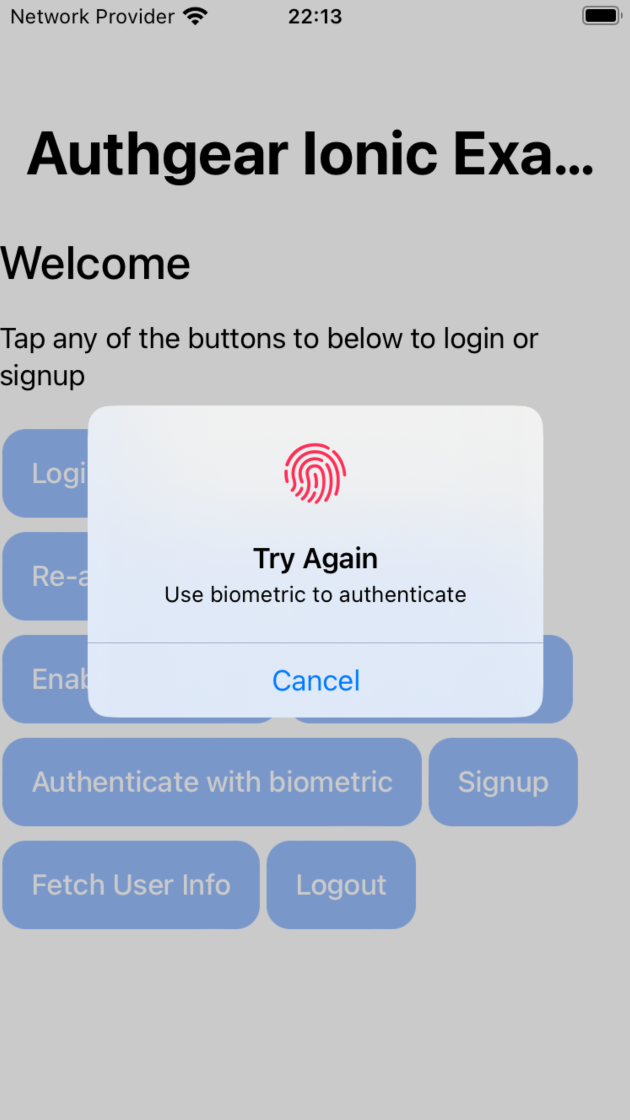
在 iOS 上,使用 BiometricLAPolicy.deviceOwnerAuthentication 策略时,生物识别登录失败后弹出的对话框如下所示:
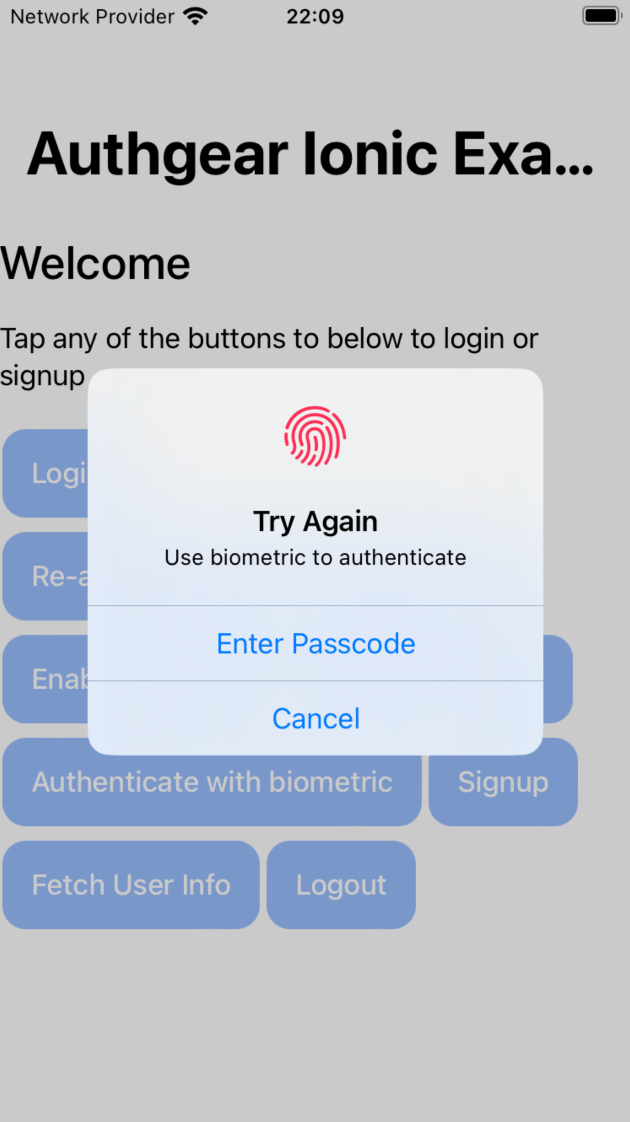
使用 BiometricLAPolicy.deviceOwnerAuthenticationWithBiometrics 策略时,生物识别登录弹窗不会包含 输入密码 按钮。示例如下: