iOS SDK
本指南将介绍如何将 Authany 集成到 iOS 应用中。
Authany iOS SDK 支持 iOS 11.0 及以上版本。本教程使用 Apple 的 Observation 框架(@Observable)和 Swift Concurrency(async/await)构建示例应用,这需要 iOS 17.0 及以上版本、Xcode 16 及以上版本,以及 Swift 6 语言模式。如果您需要支持更旧的 iOS 版本,可以使用 ObservableObject 和 SDK 的 completion handler 采用相同的结构实现。
按照本指南,🕐 10 分钟即可将 Authany 添加到您的 iOS 应用。
说明
本教程示例应用的完整代码,请参见 这个 GitHub 仓库
在 Authany 中设置应用
在 https://manage.authany.com/ 注册 Authany 管理台账号。您也可以使用自建部署的 Authany。
在项目列表中,创建一个新项目或选择一个已有项目。接下来,我们需要在该项目中创建一个 Authany 客户端应用。
步骤 1:在管理台中创建应用
在左侧菜单栏中,进入应用。
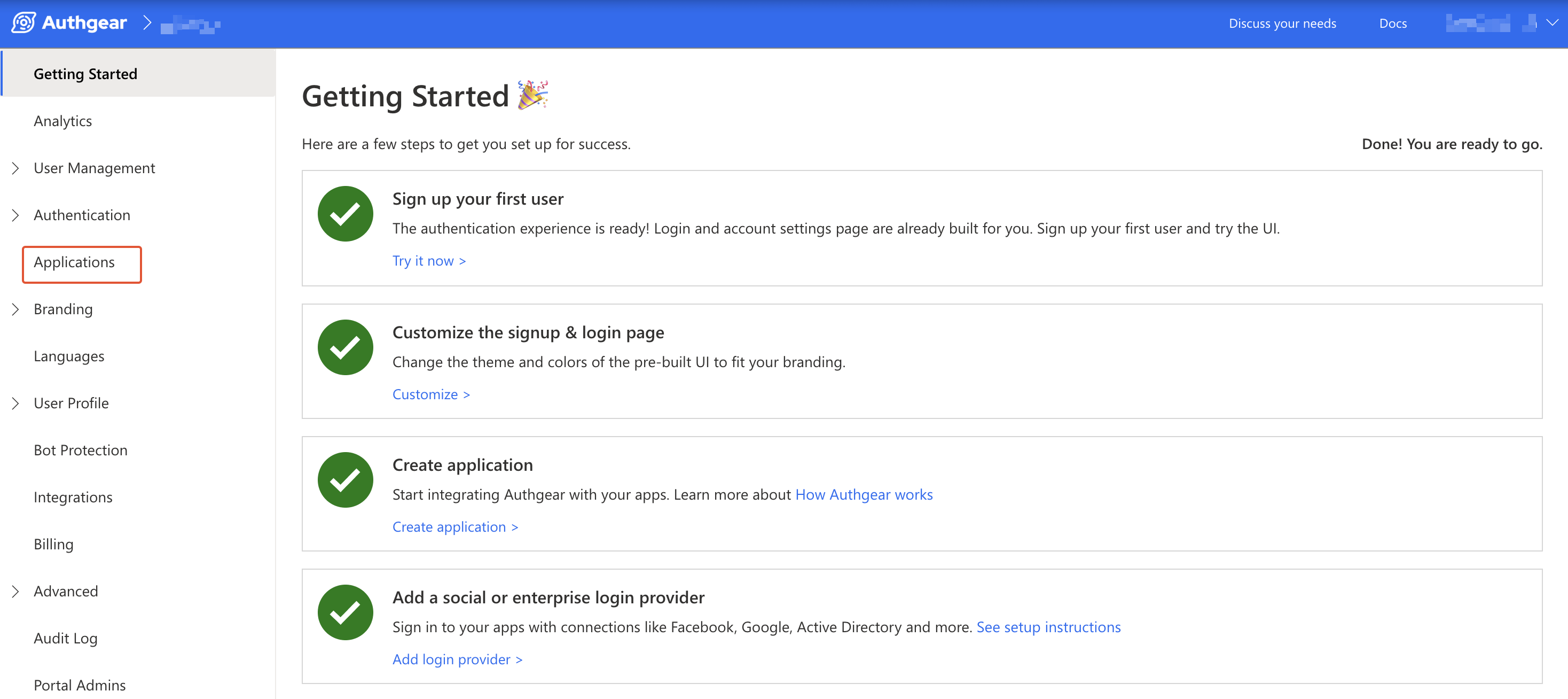
在顶部工具栏中点击⊕添加应用。
输入应用名称,并将应用类型选择为原生应用,然后点击"保存"。
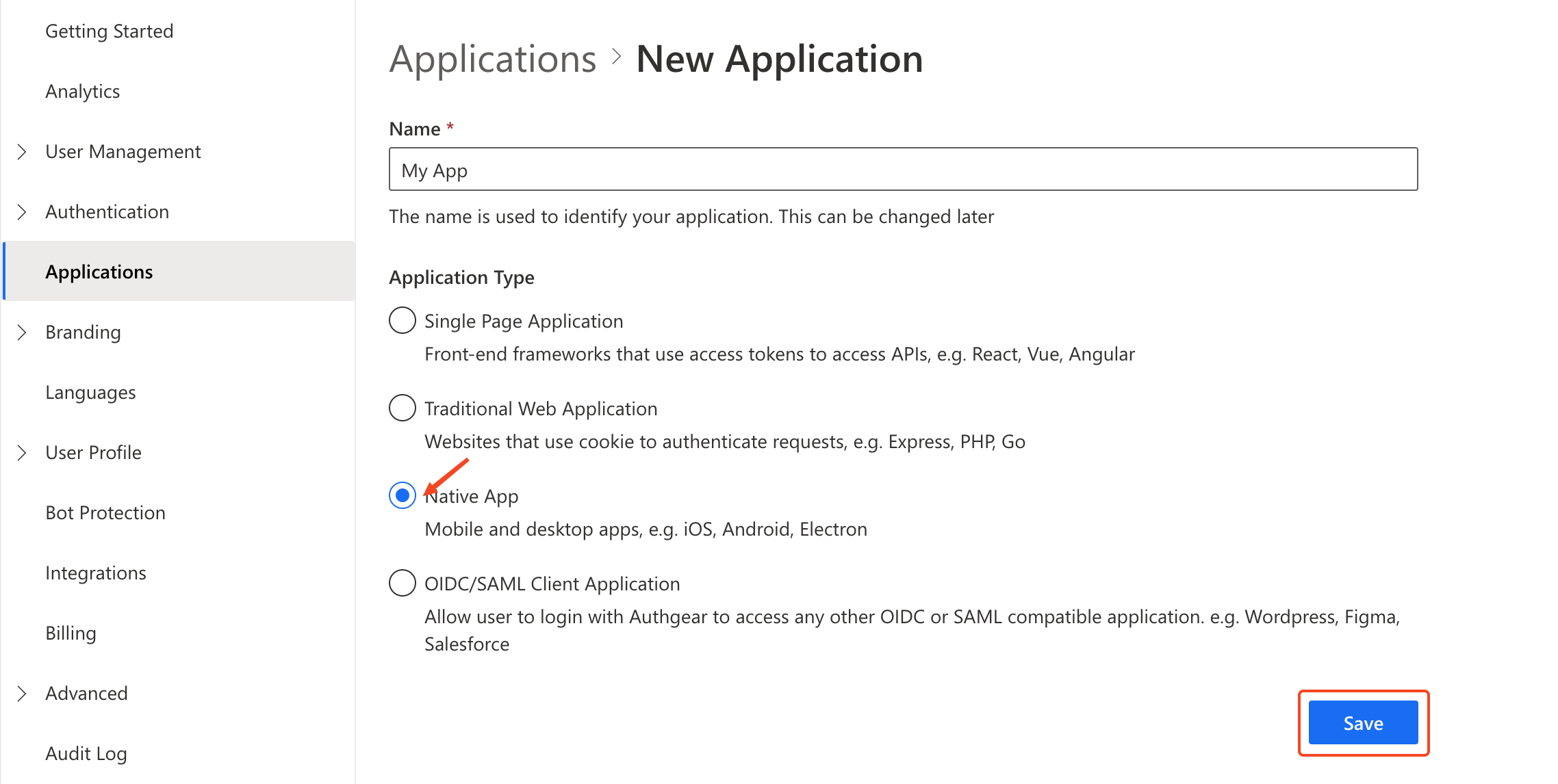
您会看到一系列有助于完成设置的指南,然后点击"下一步"。
步骤 2:配置应用
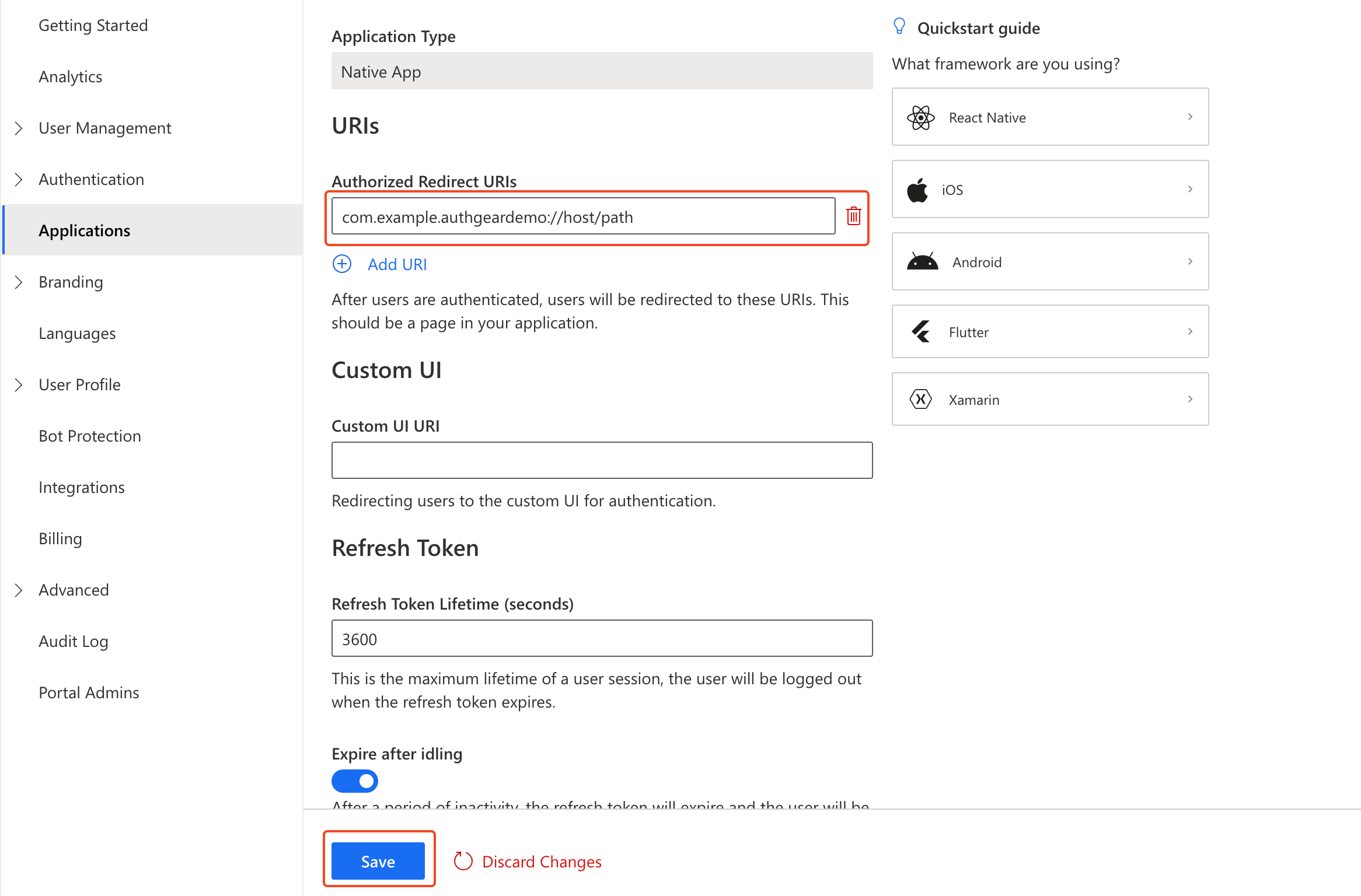
这里您需要定义一个自定义 URI scheme,Authany 会在身份验证完成后用它将用户重定向回您的应用。以我们的示例应用为例,自定义 URL scheme 是 com.example.authgeardemo,在此基础上构建的完整重定向 URI 是 com.example.authgeardemo://host/path。关于在 iOS 中设置自定义 URI scheme 的更多说明,请参见官方文档。
回到 Authany 管理台,将 com.example.authgeardemo://host/path 添加为重定向 URI。
点击"保存"按钮,并记下新建客户端应用的客户端 ID(Client ID)和端点(Endpoint),稍后会在 iOS 应用中用到。您之后也可以在应用列表中重新获取客户端 ID。
将 Authany 添加到您的 iOS 应用
在这一步中,我们将使用 Authany iOS SDK 和前面创建的客户端应用,为一个简单的 iOS 应用添加用户身份验证。
前置条件
为顺利完成本指南中的步骤,您需要准备以下条件:
- Xcode 16 或更高版本
- 一个面向 iOS 17.0 或更高版本、使用 Swift 6 语言模式的项目
- 对 SwiftUI 和 Swift Concurrency(
async/await)有一定了解
步骤 1:创建新的 iOS 项目
为便于讲解本指南,我们将在 Xcode 中创建一个新项目。如果您是将 Authany 添加到现有应用,可以跳过此步骤。
要创建新项目,打开 Xcode,进入文件(File) > 新建(New) > 项目(Project)。使用以下信息创建新项目:
- 项目名称(Project Name):
my_demo_app - 将界面(Interface)选择为
SwiftUI,其他字段保持默认,然后继续创建项目。
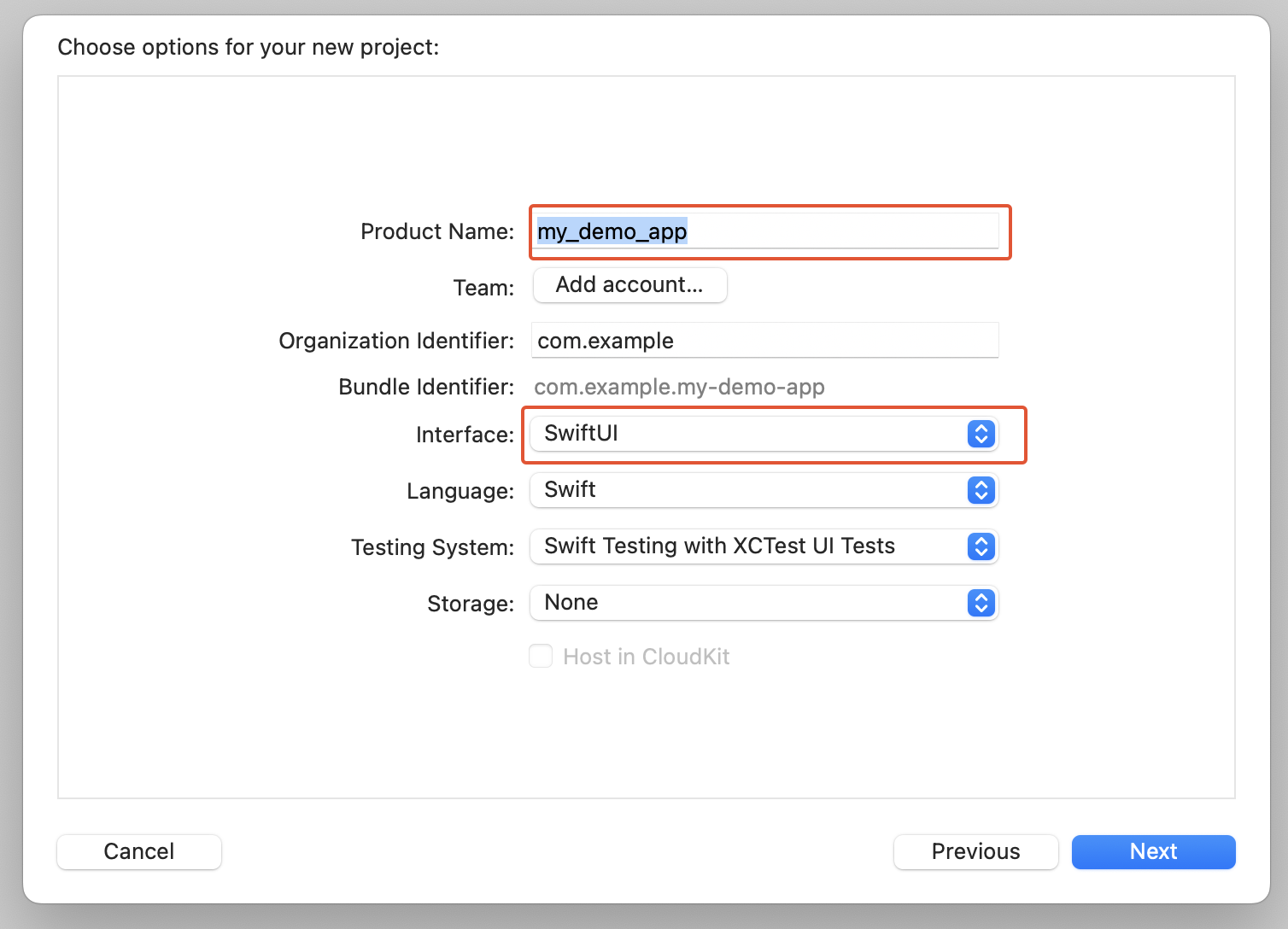
Xcode 新建项目
步骤 2:安装 Authany SDK
Authany iOS SDK 让您可以轻松在 iOS 项目中与 Authany 服务交互。
要将 Authany SDK 添加到项目中,在 Xcode 中进入文件(File) > 添加软件包依赖(Add Package Dependencies),在 Package URL 文本框中输入 https://github.com/authgear/authgear-sdk-ios.git。依赖规则选择直到下一个主版本(Up to Next Major Version),起始版本为 2.0.0。
点击添加软件包(Add Package)继续。
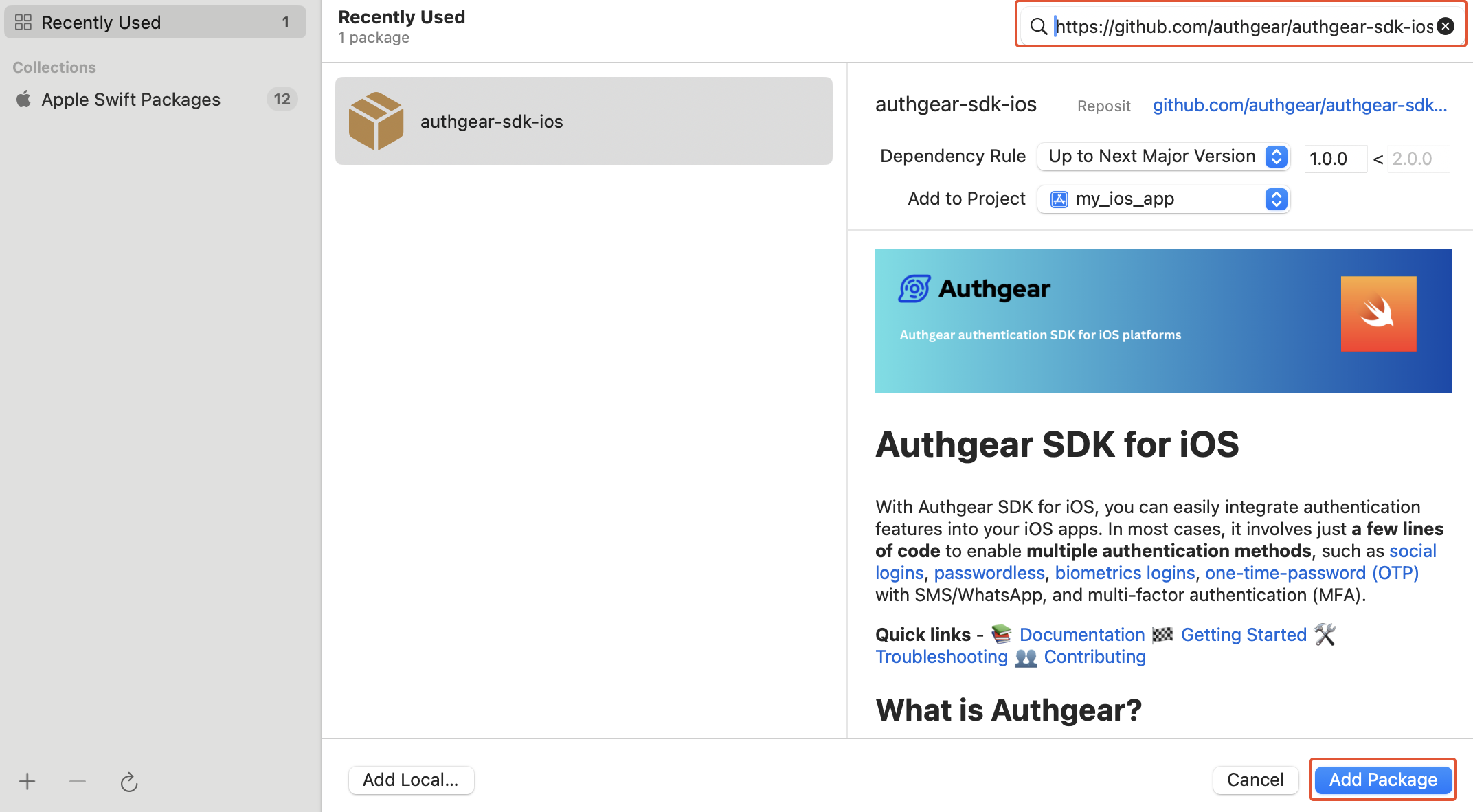
Xcode 包管理器
在下一个界面中,在添加到目标(Add to Target)下选择您的应用,然后点击添加软件包(Add Package)。
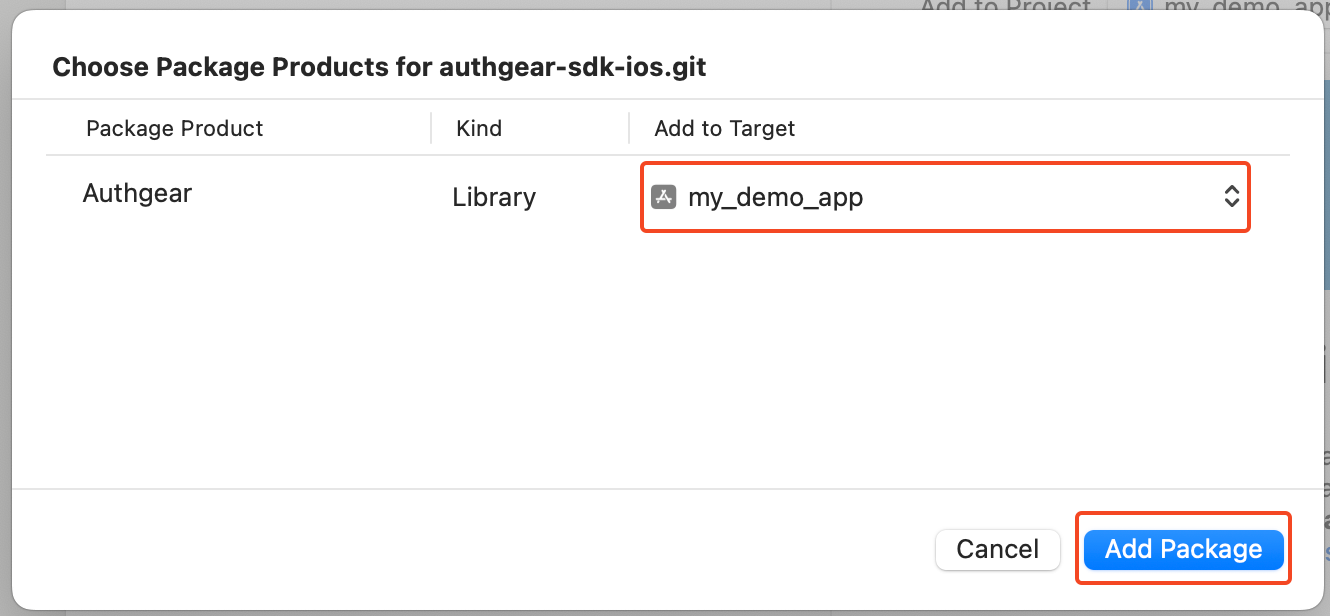
Xcode 添加软件包
如果您的项目使用 CocoaPods,也可以用以下方式安装 SDK:
步骤 3:创建身份验证模型
我们会把所有身份验证逻辑集中放在一处:一个 @Observable 模型,持有一个 Authgear 实例,并暴露一个简洁、便于界面使用的状态。视图(下一步会创建)只负责渲染该状态并调用模型的方法。
新建一个名为 AuthenticationModel.swift 的 Swift 文件,添加以下内容:
//  AuthenticationModel.swift

import Authgear
import Observation

// Sendable snapshots produced *inside* the SDK's completion handlers so that
// no non-Sendable Authgear type crosses the `await` boundary.
private enum AuthOutcome: Sendable {
    case signedIn(userID: String)
    case cancelled
    case failed(message: String)
}

private enum VoidOutcome: Sendable {
    case ok
    case failed(message: String)
}

@MainActor
@Observable
final class AuthenticationModel {
    enum State: Equatable {
        case loading
        case signedOut
        case signedIn(userID: String)
    }

    private(set) var state: State = .loading

    // Non-nil drives an error alert in the view.
    var errorMessage: String?

    private let authgear: Authgear
    private var didConfigure = false

    init() {
        authgear = Authgear(
            clientId: "<CLIENT_ID>",
            endpoint: "<AUTHGEAR_ENDPOINT>"
        )
    }

    // Configure the SDK once and restore any existing session.
    func configure() async {
        guard !didConfigure else { return }
        didConfigure = true

        let outcome: VoidOutcome = await withCheckedContinuation { continuation in
            authgear.configure { result in
                switch result {
                case .success:
                    continuation.resume(returning: .ok)
                case let .failure(error):
                    continuation.resume(returning: .failed(message: error.localizedDescription))
                }
            }
        }

        switch outcome {
        case .ok:
            // Refresh the session if the user has an existing one.
            if authgear.sessionState == .authenticated {
                await refreshCurrentUser()
            } else {
                state = .signedOut
            }
        case let .failed(message):
            errorMessage = message
            state = .signedOut
        }
    }

    // Start the interactive login flow.
    func logIn() async {
        state = .loading

        let outcome: AuthOutcome = await withCheckedContinuation { continuation in
            authgear.authenticate(redirectURI: "com.example.authgeardemo://host/path") { result in
                switch result {
                case let .success(userInfo):
                    continuation.resume(returning: .signedIn(userID: userInfo.sub))
                case let .failure(error):
                    if let authgearError = error as? AuthgearError,
                       case .cancel = authgearError {
                        continuation.resume(returning: .cancelled)
                    } else {
                        continuation.resume(returning: .failed(message: error.localizedDescription))
                    }
                }
            }
        }

        apply(outcome)
    }

    // Log out and clear the local session.
    func logOut() async {
        state = .loading

        let outcome: VoidOutcome = await withCheckedContinuation { continuation in
            authgear.logout { result in
                switch result {
                case .success:
                    continuation.resume(returning: .ok)
                case let .failure(error):
                    continuation.resume(returning: .failed(message: error.localizedDescription))
                }
            }
        }

        switch outcome {
        case .ok:
            state = .signedOut
        case let .failed(message):
            errorMessage = message
            // The SDK's session state is authoritative after a failed logout.
            if authgear.sessionState == .authenticated {
                await refreshCurrentUser()
            } else {
                state = .signedOut
            }
        }
    }

    // Open the pre-built user settings page.
    func openUserSettings() {
        authgear.open(page: .settings)
    }

    // Refresh the signed-in user's info; downgrades to signed-out if the
    // refresh token is no longer valid.
    private func refreshCurrentUser() async {
        let outcome: AuthOutcome = await withCheckedContinuation { continuation in
            authgear.fetchUserInfo { result in
                switch result {
                case let .success(userInfo):
                    continuation.resume(returning: .signedIn(userID: userInfo.sub))
                case let .failure(error):
                    continuation.resume(returning: .failed(message: error.localizedDescription))
                }
            }
        }

        apply(outcome)
    }

    private func apply(_ outcome: AuthOutcome) {
        switch outcome {
        case let .signedIn(userID):
            state = .signedIn(userID: userID)
        case .cancelled:
            state = .signedOut
        case let .failed(message):
            errorMessage = message
            state = .signedOut
        }
    }
}
将"<CLIENT_ID>"和"<AUTHANY_ENDPOINT>"替换为您之前创建的客户端项目配置页面中的客户端 ID 和端点。
说明
为什么要用 AuthOutcome / VoidOutcome 枚举?Authany SDK 提供的是 completion handler 风格的 API,其结果类型(UserInfo、SessionState、AuthgearError)并不是 Sendable 的。为了在 Swift 6 语言模式下保持代码整洁,每次调用都用 withCheckedContinuation 包装,completion 闭包只捕获 continuation,并在闭包内部提取出一个较小的 Sendable 值来 resume。这样就不会有非 Sendable 的 SDK 类型跨越 await 边界,模型也就能在严格并发检查下编译通过,而无需额外的注解。
在示例应用仓库中,客户端 ID、端点和重定向 URI 被提取到一个较小的 Constants.swift 枚举中,而不是硬编码在初始化方法里;这是实际项目中值得采用的做法。
以下是各个方法的作用:
configure():只初始化一次 SDK(通过didConfigure加以保护),如果存在此前的会话,会刷新会话,让回访用户直接进入已登录界面。logIn():执行交互式身份验证流程。用户主动取消与真正的错误会分开处理,因此取消登录弹窗不会触发错误提示。logOut():结束当前会话。如果调用失败,会以 SDK 的sessionState为准,而不是直接认定用户已登出。openUserSettings():打开 Authany 预置的用户设置页面,用户可以在其中查看和修改个人资料属性及安全设置。refreshCurrentUser():调用fetchUserInfo来更新sessionState并获取用户的sub(唯一用户 ID)。它还能检测到已被远程撤销的会话:此时sessionState会变为.noSession,模型也会回到未登录状态。
步骤 4:构建 ContentView
现在将 ContentView.swift 的内容替换为一个观察该模型的、状态驱动的视图。它会在视图首次出现时通过 .task 触发 configure(),将异步操作包装在 Task {} 中,并通过 .alert 展示任何 errorMessage:
//  ContentView.swift

import SwiftUI

struct ContentView: View {
    @State private var model = AuthenticationModel()

    var body: some View {
        VStack(spacing: 16) {
            switch model.state {
            case .loading:
                ProgressView()
            case .signedOut:
                signedOutView
            case let .signedIn(userID):
                signedInView(userID: userID)
            }
        }
        .padding()
        .task {
            await model.configure()
        }
        .alert(
            "Something went wrong",
            isPresented: Binding(
                get: { model.errorMessage != nil },
                set: { isPresented in
                    if !isPresented { model.errorMessage = nil }
                }
            ),
            presenting: model.errorMessage
        ) { _ in
            Button("OK", role: .cancel) {}
        } message: { message in
            Text(message)
        }
    }

    private var signedOutView: some View {
        VStack(spacing: 16) {
            Image(systemName: "globe")
                .imageScale(.large)
                .foregroundStyle(.tint)
            Text("My Demo App")
            Button("Login") {
                Task { await model.logIn() }
            }
        }
    }

    private func signedInView(userID: String) -> some View {
        VStack(spacing: 16) {
            Text("Welcome user \(userID)")
            Button("User Settings") {
                model.openUserSettings()
            }
            Button("Logout") {
                Task { await model.logOut() }
            }
        }
    }
}

#Preview {
    ContentView()
}
该视图没有直接调用 SDK,只读取 model.state 并调用模型的方法。未登录时显示登录(Login)按钮;操作进行中显示 ProgressView;登录成功后会问候用户,并提供用户设置(User Settings)和登出(Logout)选项。
检查点
现在运行您的应用,它应该会启动并停留在登录(Login)界面。点击登录会尝试打开身份验证页面,但暂时还不会返回您的应用。接下来我们会注册重定向 URI scheme。
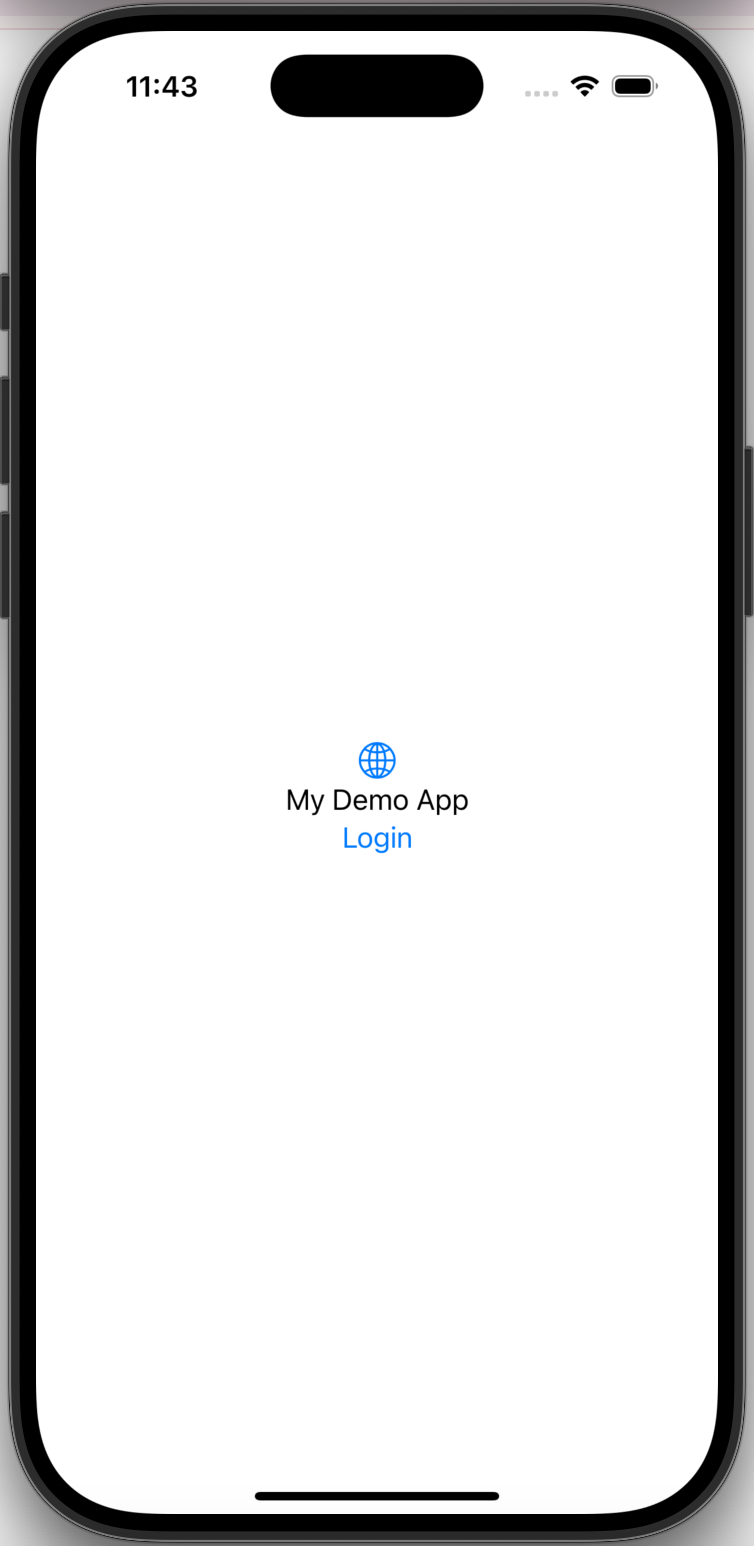
步骤 5:为重定向 URI 注册 URI Scheme
为了让 Authany 在身份验证完成后能重定向回您的应用,需要注册自定义 URL 的scheme,也就是重定向 URI 中 :// 之前的部分。以我们的重定向 URI com.example.authgeardemo://host/path 为例,scheme 就是 com.example.authgeardemo。
在 Xcode 中打开项目的 Info.plist 或项目设置界面,添加以下内容:
进入目标(Targets) > {您的项目} > 信息(Info),展开 URL Types 部分。
添加一个新的 URL scheme,具体信息如下:
标识符(Identifier):CFBundleURLTypes
URL Schemes:com.example.authgeardemo
角色(Role):Editor
Xcode 项目属性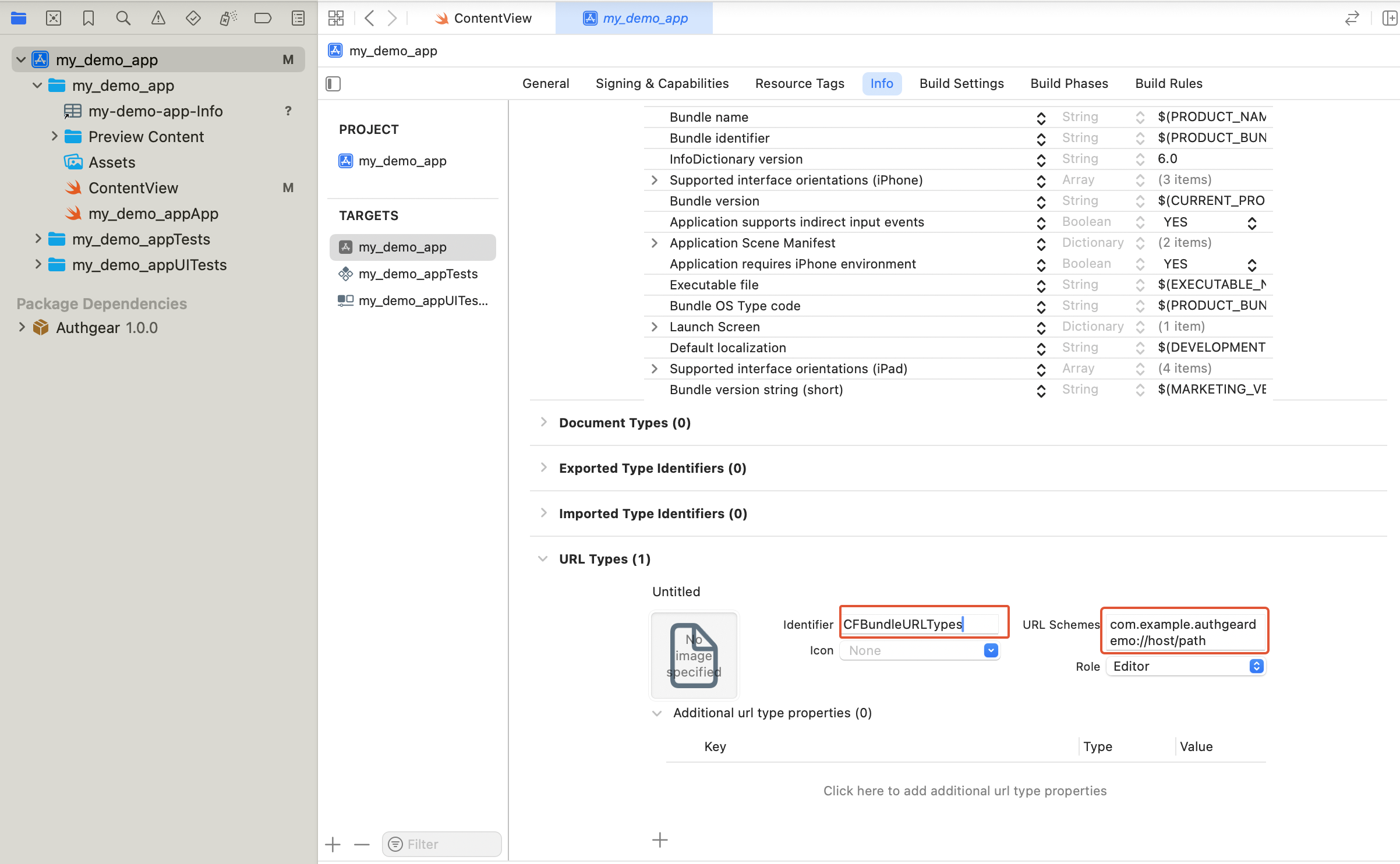
<?xml version="1.0" encoding="UTF-8"?>
<!DOCTYPE plist PUBLIC "-//Apple//DTD PLIST 1.0//EN" "http://www.apple.com/DTDs/PropertyList-1.0.dtd">
<plist version="1.0">
    <dict>
        <!-- Other entries -->
        <key>CFBundleURLTypes</key>
        <array>
            <dict>
                <key>CFBundleTypeRole</key>
                <string>Editor</string>
                <key>CFBundleURLName</key>
                <string>CFBundleURLTypes</string>
                <key>CFBundleURLSchemes</key>
                <array>
                    <string>com.example.authgeardemo</string>
                </array>
            </dict>
        </array>
    </dict>
</plist>
注意
请在 CFBundleURLSchemes 中注册裸 scheme com.example.authgeardemo,不要注册完整的重定向 URI com.example.authgeardemo://host/path。CFBundleURLSchemes 只需要 scheme 本身(即 :// 之前的部分)。完整的重定向 URI 是您在 Authany 管理台中注册、并传给 authenticate(redirectURI:) 的内容。
步骤 6:运行并测试
再次运行您的应用并尝试登录。由于重定向 scheme 已经注册,Authany 会在身份验证完成后重定向回您的应用,视图也会切换到已登录界面。
完整体验一下整个流程:
- 登录(Login):完成身份验证,并显示 "Welcome user <sub>"。
- 用户设置(User Settings):打开 Authany 预置的设置页面。
- 登出(Logout):结束会话并返回登录界面。
如果配置失败(例如端点填写错误)或身份验证出错,您在步骤 4 中添加的 .alert 会显示错误信息,而不是静默失败。
理解会话状态
您可能需要判断用户是否已登录(例如只在用户未登录时显示登录按钮)。
sessionState 反映的是用户在 SDK 本地状态中的登录状态。即使 sessionState 为 .authenticated,如果会话已被远程撤销,也可能已经失效。因此,在初始化 SDK 之后,应在合适的时机调用 fetchUserInfo 来更新 sessionState;上面模型中的 configure() → refreshCurrentUser() 正是这样做的。
sessionState 的取值可以是 .unknown、.noSession 或 .authenticated。初始值为 .unknown。调用 authgear.configure 后,如果找到此前的会话,则变为 .authenticated;如果不存在这样的会话,则变为 .noSession。
在 HTTP 请求中使用访问令牌
每次使用访问令牌前都要调用 refreshAccessTokenIfNeeded;它只有在访问令牌已过期时才会发起网络请求进行检查。然后将访问令牌放入请求的 Authorization 请求头中。和其他 SDK 调用一样,您可以用 continuation 把 completion handler 桥接成 async/await:
func callProtectedAPI() async throws {
    try await withCheckedThrowingContinuation { (continuation: CheckedContinuation<Void, Error>) in
        authgear.refreshAccessTokenIfNeeded { result in
            continuation.resume(with: result)
        }
    }

    // The access token is ready to use. It can be empty if the user is not
    // logged in or the session is invalid.
    guard let accessToken = authgear.accessToken else {
        // The user is not logged in, or the token is expired.
        return
    }

    // Example only — use your own networking library.
    var urlRequest = URLRequest(url: URL(string: "YOUR_SERVER_URL")!)
    urlRequest.setValue("Bearer \(accessToken)", forHTTPHeaderField: "authorization")
    // ... continue making your request
}
后续步骤
为了保护您的应用服务器免受未经授权的访问,您需要将后端与 Authany 集成。
iOS SDK 参考
关于 iOS SDK 的详细文档,请访问 iOS SDK 参考。