将身份验证转发到 Authany 解析器端点
本节将介绍如何在 NGINX 中设置反向代理,借助 Authany 解析器保护您的应用服务器免受未经授权的访问。您可以将不含请求体的请求转发到解析器端点。Authany 会检查 HTTP 头中的 Authorization 和 Cookie,验证令牌,并以 HTTP 200 响应,同时返回 X-Authgear- 开头的请求头,包含会话有效性、用户 ID 等信息。
如果您在部署中使用常见的反向代理,例如 NGINX、Traefik,或者 Apache APISIX 等 API 网关,只需几行简单的转发身份验证配置即可完成设置。您的后端应读取返回的请求头,以确定该 HTTP 请求的用户身份。
您也可以使用其他常见反向代理的转发身份验证功能,例如:
Authany 解析器端点
Authany 提供了一个用于转发身份验证的端点。子请求应发送到以下端点进行身份验证。
https://<your_app_endpoint>/_resolver/resolve
转发身份验证的工作原理
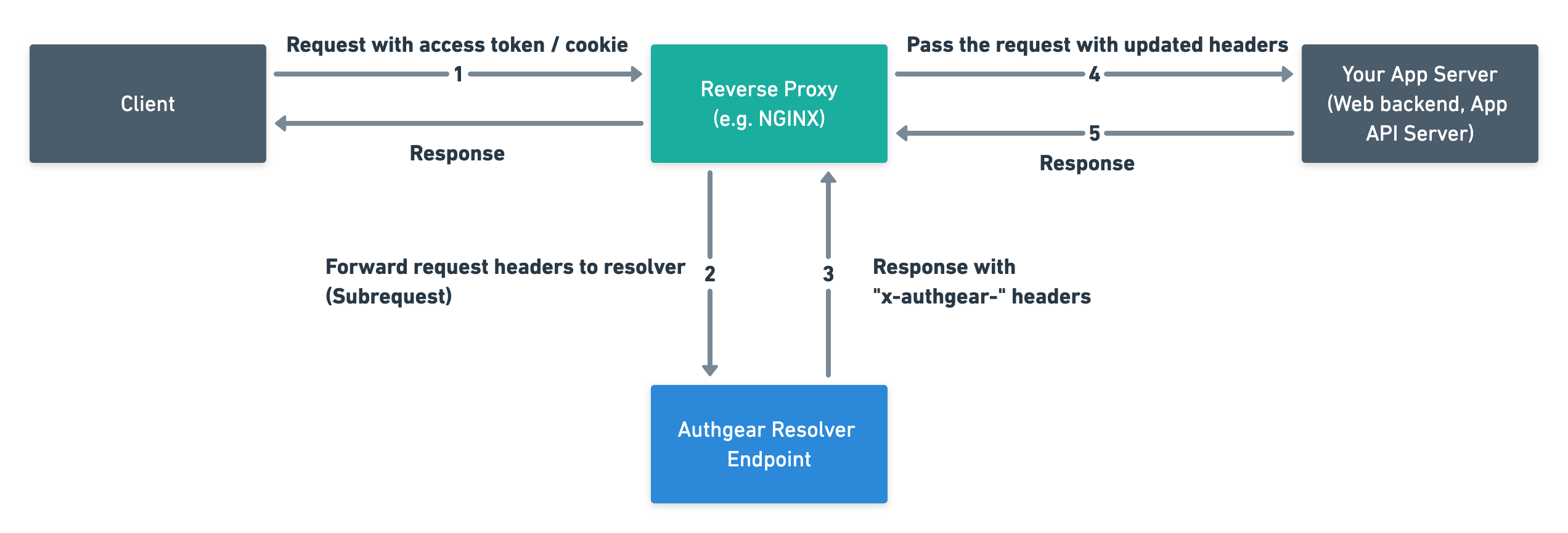
- 用户登录后,客户端应用会携带访问令牌/Cookie 向您的服务器发送应用请求。
- 在您的基础设施中设置反向代理来验证 HTTP 请求。反向代理会将不含请求体的传入 HTTP 请求转发到 Authany 解析器端点。
- Authany 解析器解析访问令牌,并返回包含用户登录状态的 HTTP 头。这些请求头以
x-authgear-开头。 - 您必须让反向代理在将请求转发到后端服务器之前,附加上这些额外的请求头。
- 您的后端服务器读取这些请求头,并相应地响应客户端应用。例如,返回用户的内容,或者在用户未登录时返回 HTTP 401。
市面上有非常多可用的反向代理。因此,这里我们以使用 Nginx 作为反向代理为例进行说明。
使用 Nginx 作为反向代理
我们将使用 NGINX 中的 auth_request 模块。该模块默认不会被编译进来,需要通过 --with-http_auth_request_module配置参数启用。
运行以下命令,并确认输出中包含 --with-http_auth_request_module:
这里的关键在于声明一个内部 location,并使用 auth_request 向解析端点发起子请求。
配置示例
server {
  # Use variable in proxy_pass with resolver to respect DNS TTL.
  # Note that /etc/hosts and /etc/resolv.conf are NOT consulted if resolver is used.
  # See https://www.nginx.com/blog/dns-service-discovery-nginx-plus/
  resolver 8.8.8.8;

  # Location that requires request authentication
  location / {
    set $backend http://www.mycompany.com;
    proxy_pass $backend;
    proxy_set_header Host $host;
    # Specify the auth_request directive to initiate subrequests to the to the internal location.
    # This corresponds to the Step 2.
    auth_request /_auth;

    # Copy the `x-authgear-*` headers from the response of the subrequest to Nginx variables.
    # This corresponds to the Step 3.
    auth_request_set $x_authgear_session_valid $upstream_http_x_authgear_session_valid;
    auth_request_set $x_authgear_user_id $upstream_http_x_authgear_user_id;
    auth_request_set $x_authgear_user_anonymous $upstream_http_x_authgear_user_anonymous;
    auth_request_set $x_authgear_user_verified $upstream_http_x_authgear_user_verified;
    auth_request_set $x_authgear_session_acr $upstream_http_x_authgear_session_acr;
    auth_request_set $x_authgear_session_amr $upstream_http_x_authgear_session_amr;
    auth_request_set $x_authgear_session_authenticated_at $upstream_http_x_authgear_session_authenticated_at;
    auth_request_set $x_authgear_user_can_reauthenticate $upstream_http_x_authgear_user_can_reauthenticate;

    # Include the headers in the request that will be sent to your backend server.
    # This corresponds to the Step 4.
    proxy_set_header x-authgear-session-valid $x_authgear_session_valid;
    proxy_set_header x-authgear-user-id $x_authgear_user_id;
    proxy_set_header x-authgear-user-anonymous $x_authgear_user_anonymous;
    proxy_set_header x-authgear-user-verified $x_authgear_user_verified;
    proxy_set_header x-authgear-session-acr $x_authgear_session_acr;
    proxy_set_header x-authgear-session-amr $x_authgear_session_amr;
    proxy_set_header x-authgear-session-authenticated-at $x_authgear_session_authenticated_at;
    proxy_set_header x-authgear-user-can-reauthenticate $x_authgear_user_can_reauthenticate;

    # Your backend must inspect the request headers to determine whether the request is authenticated or not.
    # This corresponds to the Step 5.
  }

  location = /_auth {
    # Set this location for internal use only
    internal;
    # Replace <YOUR_AUTHGEAR_ENDPOINT> with your authgear endpoint.
    # For example, https://example.authanyid.com
    set $resolver <YOUR_AUTHGEAR_ENDPOINT>/_resolver/resolve;
    proxy_pass $resolver;
    # Set the host so that authgear knows which app is calling the resolver endpoint
    # Replace <YOUR_AUTHGEAR_ENDPOINT_HOST> with the host of your authgear endpoint.
    # For example, example.authanyid.com
    proxy_set_header Host <YOUR_AUTHGEAR_ENDPOINT_HOST>;
    # The body is supposed to be consumed by your backend server.
    # Pass only the headers to the resolver
    proxy_pass_request_body off;
    proxy_set_header Content-Length "";
  }
}
说明
如需了解更多详情,请参阅 NGINX 中 auth_request 的相关文档:http://nginx.org/en/docs/http/ngx_http_auth_request_module.html
优化性能
如果反向代理、Authany 和您的后端服务器分别位于不同地区,那么对每个请求都进行身份验证可能会导致性能大幅下降。
您可以考虑启用缓存。
http {
  # ...
  proxy_cache_path /tmp/cache keys_zone=auth_cache:10m;

  # The server block.
  server {
    # ...
    location = /_auth {
      # ...
      proxy_cache auth_cache;
      proxy_cache_key "$cookie_session|$http_authorization";
      proxy_cache_valid 200 10m;  # Adjust cache duration as desired.
    }
  }
}
请求头参考
请参阅规范中 x-authgear- 请求头列表:https://github.com/authgear/authgear-server/blob/master/docs/specs/api-resolver.md