Webhook/自定义脚本
Webhook 和自定义 JavaScript/TypeScript 是配置 Authany 项目以使用自定义短信服务商的方式之一。
本指南将介绍如何把默认短信服务商切换为几乎任意第三方短信服务商。
前提条件
- 一个提供可接受外部 HTTPS 请求的 API 端点的短信服务商。
- 一个已启用自定义短信网关功能的 Authany 项目。
说明
注意: 您的项目必须使用企业版套餐才能使用自定义短信服务商功能。详情请联系我们。
步骤 1:启用自定义短信网关
要启用自定义短信网关,请登录 Authany 管理台,进入高级 > 自定义短信网关。
打开启用自定义短信网关开关,以启用自定义短信服务商。
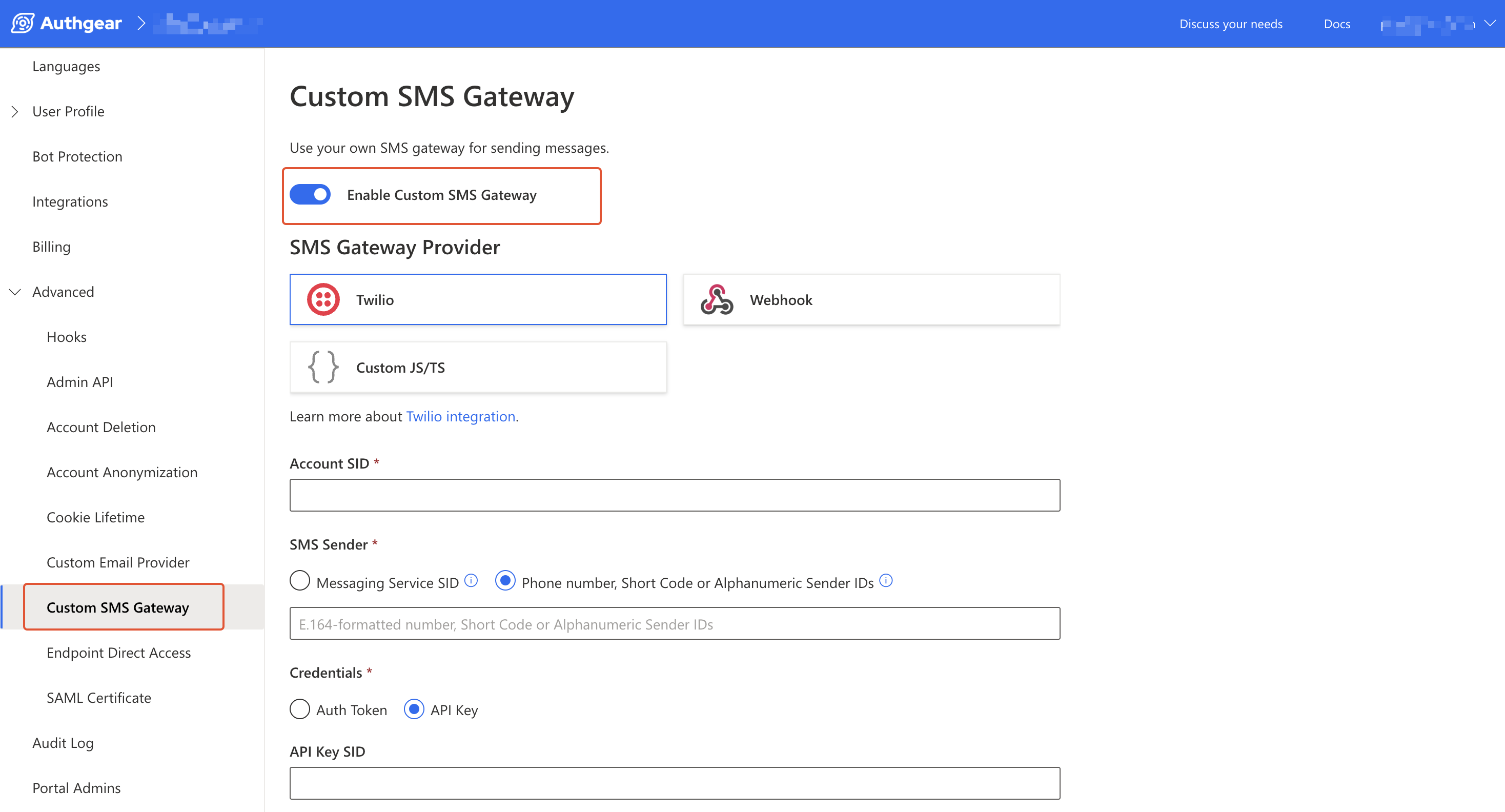
Authany 自定义短信网关
步骤 2:选择短信网关服务商
在短信网关服务商中选择 Webhook,通过 Webhook 设置自定义短信服务商。
或者,选择 Custom JS/TS,在 Authany 项目中使用自定义 JavaScript/TypeScript 代码设置自定义短信服务商。
步骤 3:设置 Webhook 或实现自定义脚本
在实现 webhook 或自定义脚本之前,需要重点了解 Authany 应用将发送到您端点的 payload 结构。
Payload
以下是自定义短信 webhook 和自定义 JS/TS 使用的 JSON payload 结构(CustomSMSGatewayPayload)。
{
  "to": "+44123456789",
  "body": "420240 is your french verification code.\n\nDon't share it with anyone.\n",
  "app_id": "demo-enterprise",
  "template_name": "verification_sms.txt",
  "language_tag": "en",
  "template_variables": {
    "app_name": "french",
    "client_id": "tester",
    "code": "420240",
    "host": "your-app.example.com",
    "phone": "+447549293826",
    "state": "eyK1b2hjjnI6IkdaI1qwwe5KVlMySEU7Ghhjsjs"
  }
}
to是接收者的手机号码。body字段包含实际的消息内容。app_id:发送短信的 Authany 项目的标识符。template_name:该值表示用于生成body消息内容的具体短信模板类型。例如,当使用 Authany 管理台中 邮件/短信模板 里设置的验证模板发送验证短信时,值为 verification_sms.txt。language_tag:指定消息语言的标签。template_variables:这是一个对象,包含了用于向短信模板添加动态内容的所有变量,例如 OTPcode、应用的app_name等。
Webhook
对于 Webhook,请按以下步骤配置相关选项:
- Webhook Endpoint: 输入应用中用于接收 Authany webhook 请求 payload 并据此发送短信的页面完整 URL。
- JSON Payload Sample: 此部分展示 JSON payload 的结构,其中关键字段包括
to和body。 - Webhook Signature Secret Key: 此字段显示您项目的 Webhook 签名密钥。每个 webhook 事件请求都包含一个签名,用于确认请求来自 Authany。建议您在处理请求前先验证该签名,确认请求确实来自您的 Authany 项目。参见验证签名。
- Timeout: 输入 1 到 60 之间的值。如果您的 webhook 需要更长时间响应,请使用接近最大值的数字。
Custom JS/TS
在自定义脚本编辑器中实现向自定义短信服务商发送 HTTPS 请求的逻辑。
默认的示例代码是很好的入门起点:
import { CustomSMSGatewayPayload, CustomSMSGatewayResponse } from "https://deno.land/x/authgear_deno_hook@v1.5.0/mod.ts";

export default async function (e: CustomSMSGatewayPayload): Promise<CustomSMSGatewayResponse> {
  const body = JSON.stringify(e);
  const response = await fetch("https://some.sms.gateway", {
    method: "POST",
    body: body,
  });

  if (!response.ok) {
    return {
      code: "delivery_rejected",
    }
  }

  return {
    code: "ok",
  }
}
将 https://some.sms.gateway 替换为您短信服务商的实际端点。
e 中包含 payload(CustomSMSGatewayPayload),其中含有 body 和 to(接收者的手机号码)等详情。参见上文的完整 payload 示例。
以下示例展示了如何通过 Custom JS/TS 发送短信:
import { CustomSMSGatewayPayload, CustomSMSGatewayResponse } from "https://deno.land/x/authgear_deno_hook@v1.5.0/mod.ts";

export default async function (e: CustomSMSGatewayPayload): Promise<CustomSMSGatewayResponse> {
  const gatewayJson =  {
    "SMS": {
        "auth": {
            "username": "user@example.com",
            "apikey": "abc13de25fgh46"
        },
        "message": {
            "sender": "AG Test",
            "messagetext": e.body,
            "flash": "0"
        },
        "recipients":
        {
            "gsm": [
                {
                    "msidn": e.to
                }
            ]
        }
      }
    };
  const response = await fetch("https://api.example.com/sendsms.json", {
    method: "POST",
    body: JSON.stringify(gatewayJson),
    headers: {
      "Content-Type": "application/json"
    },
  });

  if (!response.ok) {
    return {
      code: "delivery_rejected",
    }
  }

  return {
    code: "ok",
  }
}
在上面的示例中,我们从 Authany 的 CustomSMSGatewayPayload(e)中读取 to 和 body 的值,并用它们构建自定义短信网关所需的 JSON 数据格式。
请参阅您短信网关的官方文档,了解如何构造 HTTPS 请求。
响应
Webhook 和 JavaScript/TypeScript 使用相同的响应格式。以下是您的 webhook 或自定义脚本为提供更好的用户体验和错误处理而应发送给 Authany 的响应结构:
code:该字段为必填项,取值可以是以下字符串之一:ok:短信发送成功时返回此代码。invalid_phone_number:接收者手机号码无效时返回此代码。rate_limited:触发速率限制时返回此代码,用户应重试该请求。authentication_failed:某种身份验证失败时返回此代码,开发者应检查当前配置。delivery_rejected:短信发送服务因用户无法通过重试解决的原因拒绝该请求时返回此代码。provider_error_code:这是一个可选字段,用于包含可在 Authany 管理台中显示、帮助调试的错误代码。一种好的用法是填入自定义短信服务商(例如 Twilio)返回的错误代码。该值应为字符串。
步骤 4:保存并测试自定义短信服务商
最后,点击保存按钮保存新的自定义服务商设置。
要测试配置是否生效,请点击保存按钮旁边的测试按钮,输入您的手机号码,然后点击发送以测试新的短信服务商。