客户支持链接
如果用户失去了 MFA 身份验证器的访问权限,可以使用紧急恢复代码找回账号。但用户也可能遗失了恢复代码,这时就需要联系客户支持。
设置客户支持链接
您可以在管理台中添加客户支持链接。
- 在管理台中进入 UI Settings
- 在 Link Settings 部分填写 Customer Support Link
- 保存 设置。
该值将用作 <a> HTML 标签的 href,可以是 URL,也可以是 mailto: 链接。
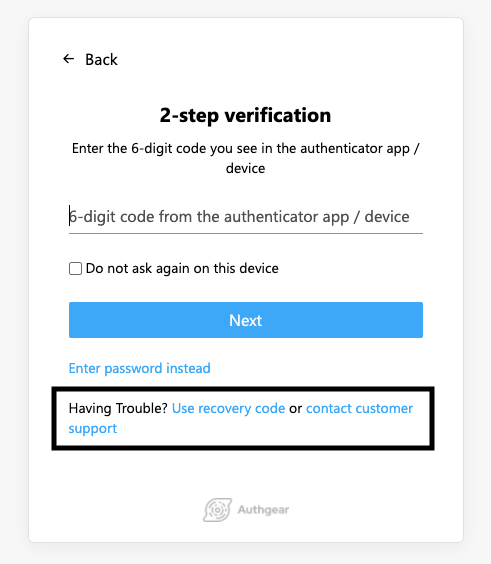
自定义显示文案
您还可以在 translation.json 中加入两个特殊的翻译键,修改向终端用户展示的文案。
{
    "enter-recovery-code-instead-v1": "Having Trouble? <button class=\"btn secondary-btn\" type=\"submit\">Use recovery code</button>",
    "enter-recovery-code-instead-with-customer-support-v1": "Having Trouble? <button class=\"btn secondary-btn\" type=\"submit\">Use recovery code</button> or <a class=\"link\" target=\"_blank\" href={customerSupportLink}>contact customer support</a>",
}