将移动应用接入微信
说明
微信开放平台账号(WeChat Open Platform account)与微信公众平台账号(WeChat Official account)不同。Authany 支持通过微信开放平台账号集成微信登录。
前提条件
- 注册一个微信开放平台账号(WeChat Open Platform account)。
- 注册一个移动应用。
- 对于 iOS,您的应用需要支持 Associated Domains 和 Universal Links。详情请参阅 Apple 的官方文档。
- 对于 Android,需要提供签名 keystore 的 MD5 指纹
更多详情请参阅附录:在微信开放平台创建移动应用。
注意
微信登录与通行密钥不兼容
使用微信登录需要用到 WebKitWebViewUIImplementation,而它不支持通行密钥 API。目前,您的移动应用中只能启用通行密钥或微信登录中的一种。
从微信开放平台获取信息
移动应用在平台审核通过后,您会在应用详情页看到 ":white_check_mark:已通过" 字样。
- 获取
appid(Client ID)。
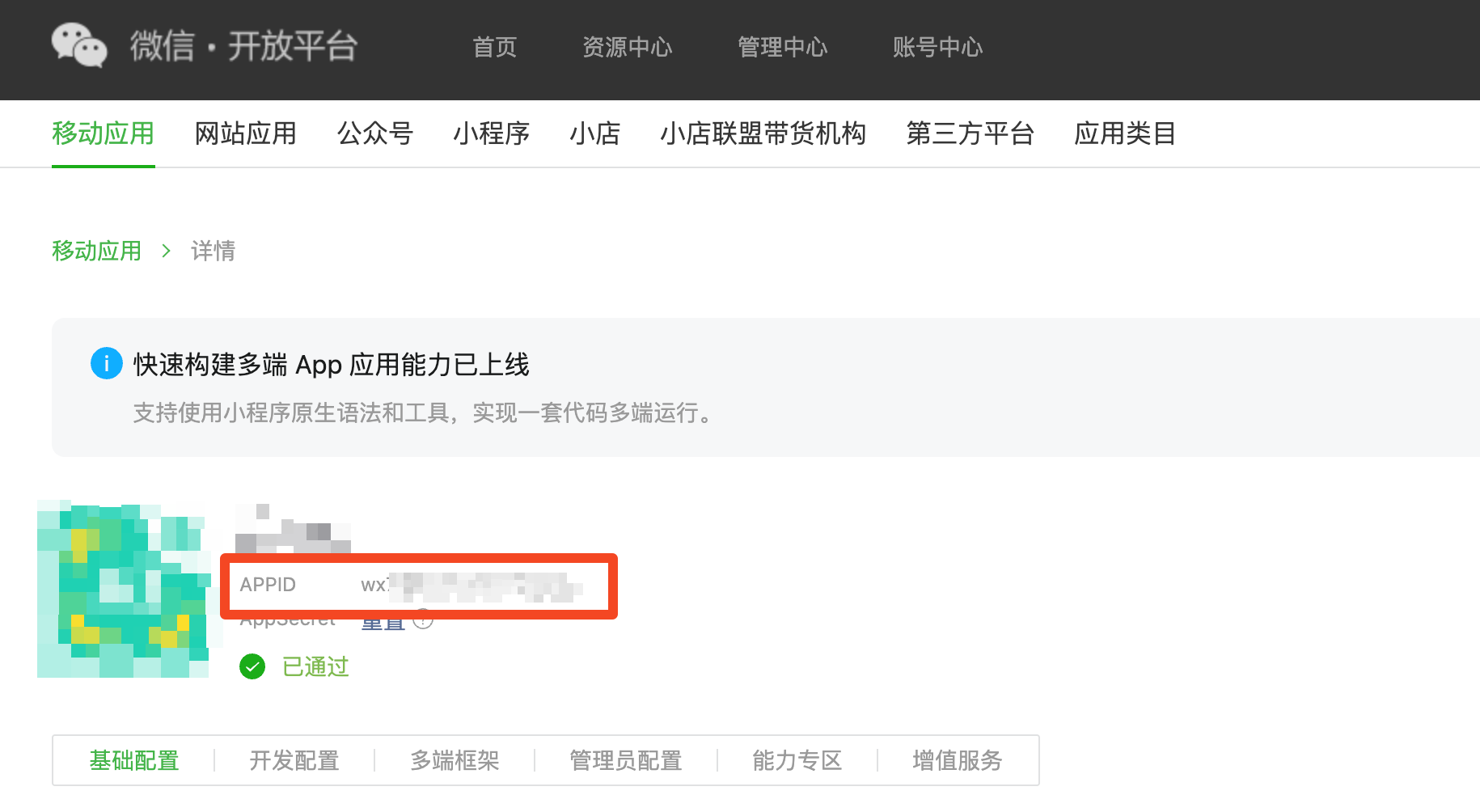
在哪里查看 appid
- 获取
appsecret(Client Secret)。它只会显示一次,如果丢失需要重新生成。
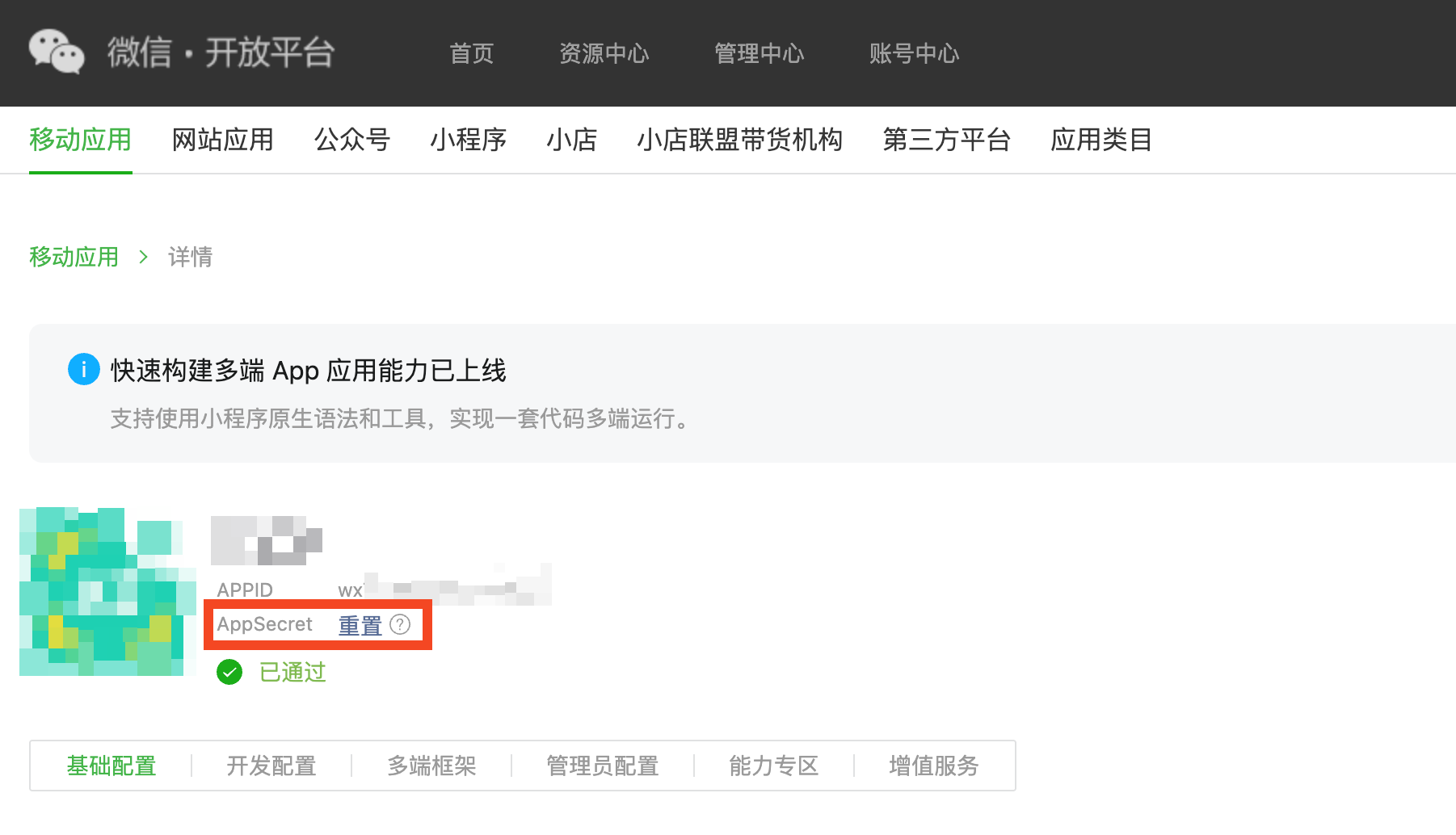
在哪里查看 appsecret
- 获取您微信开放平台账号的
原始ID(Account ID)。
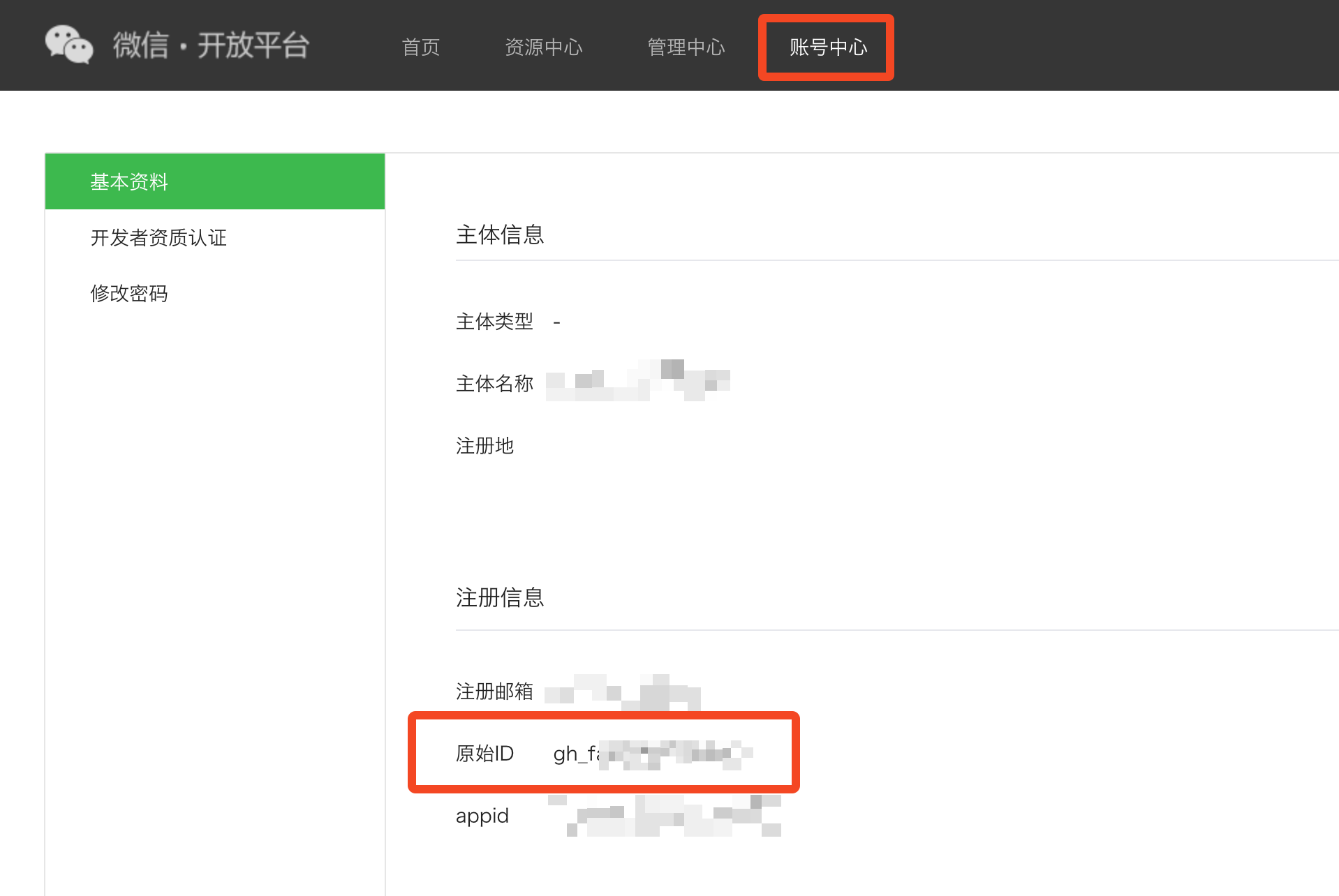
在哪里查看账号 ID
在 Authany 管理台配置微信登录
- 登录 Authany 管理台。
- 选择您的项目。
- 在导航菜单中,进入身份验证 > 社交 / 企业登录。
- 点击添加连接。
- 选择 WeChat Mobile / 移动应用。
- 在 Client ID 中填入
appid。 - 在 Client Secret 中填入
appsecret。 - 在 Account ID 中填入
原始ID。 - 添加一个 WeChat Redirect URI。这通常是一个自定义 URI,其 scheme 为您的 iOS bundle identifier 或 Android package name。例如
com.myapp://authgear/open_wechat_app。 - 保存。
在 iOS 应用中集成微信 SDK
说明
如果您没有 iOS 应用,可以跳过本节。
说明
本节假设您使用 CocoaPods 安装微信 SDK。
要在 iOS 应用中集成微信 SDK,您需要阅读官方接入指南。
本节提醒您一些在官方接入指南中容易遗漏的要点。
安装最新版本的 iOS 微信 SDK
最新版本可以在此链接查看。截至撰写本文时,最新版本是 2.0.4。
在 Info.plist 中指定您的微信 appid
    <key>CFBundleURLTypes</key>
    <array>
        <dict>
            <key>CFBundleTypeRole</key>
            <string>Editor</string>
            <key>CFBundleURLName</key>
            <string>weixin</string>
            <key>CFBundleURLSchemes</key>
            <array>
                <string>wxYOUR_WECHAT_APPID</string>
            </array>
        </dict>
    </array>
在 Info.plist 中指定 LSApplicationQueriesSchemes
    <key>LSApplicationQueriesSchemes</key>
    <array>
        <string>weixin</string>
        <string>weixinULAPI</string>
        <string>weixinURLParamsAPI</string>
    </array>
如果您还有其他 scheme,需要确保微信相关的 scheme 排在前 50 项之内。
确保 OTHER_LDFLAGS 中包含 -ObjC
说明
如果没有这样做,您会遇到这个错误。
iOS 微信 SDK 依赖 Objective-C runtime,因此您的应用必须链接 Objective-C runtime。为此,您需要确保 OTHER_LDFLAGS 中包含 -ObjC。
-ObjC 这个 flag 在 CocoaPods 中比较特殊,您不能通过 CocoaPods 的 post_install hook 来添加它。
如果您的 iOS 应用是用 React Native 编写的,由于 React Native 依赖 Objective-C runtime,OTHER_LDFLAGS 中很可能已经包含了 -ObjC。
否则,您需要手动编辑 Build Settings,加入 -ObjC flag。
添加 iOS 微信 SDK 的集成代码
在您的 AppDelegate.swift 中
@UIApplicationMain
class AppDelegate: UIResponder, UIApplicationDelegate, WXApiDelegate {

  func application(_ application: UIApplication, didFinishLaunchingWithOptions launchOptions: [UIApplication.LaunchOptionsKey: Any]?) -> Bool {
    // Insert this line to register your WeChat mobile application.
    WXApi.registerApp("wxYOUR_WECHAT_APPID", universalLink: "https://myapp.com/wechat/")
    return true
  }

  func application(_ app: UIApplication, open url: URL, options: [UIApplication.OpenURLOptionsKey : Any] = [:]) -> Bool {
    // Forward the URL to the WeChat SDK.
    // If the URL is about WeChat integration, onResp will be called.
    WXApi.handleOpen(url, delegate: self)
    return true
  }

  func application(_ application: UIApplication, open url: URL, sourceApplication: String?, annotation: Any) -> Bool {
    // Forward the URL to the WeChat SDK.
    // If the URL is about WeChat integration, onResp will be called.
    WXApi.handleOpen(url, delegate: self)
    return true
  }

  func application(_ application: UIApplication, continue userActivity: NSUserActivity, restorationHandler: @escaping ([UIUserActivityRestoring]?) -> Void) -> Bool {
    // Forward the NSUserActivity to the WeChat SDK.
    // If the NSUserActivity is about WeChat integration, onResp will be called.
    WXApi.handleOpenUniversalLink(userActivity, delegate: self)
    return true
  }

  // Implements WXApiDelegate.
  // You need not do any thing special in this method.
  func onReq(_ req: BaseReq) {}

  // The WeChat SDK will call this method if the forwarded callbacks are about WeChat.
  func onResp(_ resp: BaseResp) {
    guard let authResp = resp as? SendAuthResp else {
      return
    }

    let errCode = WXErrCode(rawValue: authResp.errCode)
    if errCode == WXSuccess {
      let state = authResp.state
      let code = authResp.code
      // Forward code to Authgear SDK.
    } else {
      // Handle the error returned by the WeChat SDK properly to deliver good user experience.
    }
  }
}
在您的 SceneDelegate 中(如果有的话)
class SceneDelegate: UIResponder, UIWindowSceneDelegate {
  func scene(_ scene: UIScene, continue userActivity: NSUserActivity) {
    // Assume your AppDelegate is the single point of handling WeChat callback,
    // you need to get it back.
    let appDelegate = UIApplication.shared.delegate as? AppDelegate

    // Forward the NSUserActivity to the WeChat SDK.
    // If the NSUserActivity is about WeChat integration, onResp on AppDelegate will be called.
    WXApi.handleOpenUniversalLink(userActivity, delegate: appDelegate)
  }
}
在您的 AppDelegate.h 中
// Import the WeChat SDK header file.
#import <WXApi.h>

// Declare your AppDelegate to be a WXApiDelegate.
@interface AppDelegate : UIResponder<UIApplicationDelegate, WXApiDelegate>

@end
在您的 AppDelegate.m 中
@implementation AppDelegate

- (BOOL)application:(UIApplication *)application didFinishLaunchingWithOptions:(NSDictionary *)launchOptions
{
  // Insert this line to register your WeChat mobile application.
  [WXApi registerApp:@"wxYOUR_WECHAT_APPID" universalLink:@"https://myapp.com/wechat/"];
  return true;
}

- (BOOL)application:(UIApplication *)application handleOpenURL:(NSURL *)url {
  // Forward the URL to the WeChat SDK.
  // If the URL is about WeChat integration, onResp will be called.
  [WXApi handleOpenURL:url delegate:self];
  return true;
}

- (BOOL)application:(UIApplication *)application openURL:(NSURL *)url sourceApplication:(NSString *)sourceApplication annotation:(id)annotation {
  // Forward the URL to the WeChat SDK.
  // If the URL is about WeChat integration, onResp will be called.
  [WXApi handleOpenURL:url delegate:self];
  return true;
}

- (BOOL)application:(UIApplication *)application continueUserActivity:(NSUserActivity *)userActivity restorationHandler:(void(^)(NSArray<id<UIUserActivityRestoring>> * __nullable restorableObjects))restorationHandler {
  // Forward the NSUserActivity to the WeChat SDK.
  // If the NSUserActivity is about WeChat integration, onResp will be called.
  [WXApi handleOpenUniversalLink:userActivity delegate:self];
  return true;
}

// Implements WXApiDelegate.
// You need not do any thing special in this method.
-(void) onReq:(BaseReq*)req
{
}

// The WeChat SDK will call this method if the forwarded callbacks are about WeChat.
-(void) onResp:(BaseResp*)resp
{
  if([resp isKindOfClass:[SendAuthResp class]]) {
    SendAuthResp *sendAuthResp = (SendAuthResp*)resp;
    if (sendAuthResp.errCode == WXSuccess) {
      NSString *state = sendAuthResp.state;
      NSString *code = sendAuthResp.code;
      // Forward code to Authgear SDK.
    } else {
      // Handle the error returned by the WeChat SDK properly to deliver good user experience.
    }
  }
}

@end
在您的 SceneDelegate.m 中(如果有的话)
@implementation SceneDelegate

- (void)scene:(UIScene *)scene continueUserActivity:(NSUserActivity *)userActivity {
  // Assume your AppDelegate is the single point of handling WeChat callback,
  // you need to get it back.
  AppDelegate *appDelegate = (AppDelegate *)[[UIApplication sharedApplication] delegate];

  // Forward the NSUserActivity to the WeChat SDK.
  // If the NSUserActivity is about WeChat integration, onResp on AppDelegate will be called.
  [WXApi handleOpenUniversalLink:userActivity delegate:appDelegate];
}

@end
在 Android 应用中集成微信 SDK
说明
如果您没有 Android 应用,可以跳过本节。
要在 Android 应用中集成微信 SDK,您需要阅读官方接入指南。
本节提醒您一些在官方接入指南中容易遗漏的要点。
安装最新版本的 Android 微信 SDK
最新版本可以在此链接查看。截至撰写本文时,最新版本是 6.8.34。
在 AndroidManifest.xml 中声明 <queries>
您需要在 AndroidManifest.xml 中声明,您的应用在运行时需要查询微信 App 是否存在。
将以下内容添加到您的 AndroidManifest.xml。
在 AndroidManifest.xml 中声明回调 Activity
微信 SDK 会打开 PACKAGE_NAME.wxapi.WXEntryActivity 这个 Activity。您需要实现这个 Activity,并在 AndroidManifest.xml 中声明它。
  <activity
    <!-- android:name MUST match the package name you tell WeChat Open Platform -->
    android:name="com.myapp.wxapi.WXEntryActivity"
    <!-- It must be exported, otherwise the WeChat app will not be able to open it -->
    android:exported="true"
    <!-- The official guide says it should be singleTask -->
    android:launchMode="singleTask"
    <!-- android:taskAffinity MUST match the package name you tell WeChat Open Platform -->
    android:taskAffinity="com.myapp"
    android:theme="@android:style/Theme.Translucent.NoTitleBar">
  </activity>
实现回调 Activity
该 Activity 的完整 Java 类名必须是 PACKAGE_NAME.wxapi.WXEntryActivity。如果您告知微信开放平台的包名是 com.myapp,那么该 Activity 的完整 Java 类名必须是 com.myapp.wxapi.WXEntryActivity。
下面是一个基于 BroadcastReceiver 的示例实现:
import com.tencent.mm.opensdk.constants.ConstantsAPI;
import com.tencent.mm.opensdk.modelbase.BaseReq;
import com.tencent.mm.opensdk.modelbase.BaseResp;
import com.tencent.mm.opensdk.modelmsg.SendAuth;
import com.tencent.mm.opensdk.openapi.IWXAPI;
import com.tencent.mm.opensdk.openapi.IWXAPIEventHandler;
import com.tencent.mm.opensdk.openapi.WXAPIFactory;

public class WXEntryActivity extends Activity implements IWXAPIEventHandler {
    private IWXAPI api;

    @Override
    public void onCreate(Bundle savedInstanceState) {
        super.onCreate(savedInstanceState);

        api = WXAPIFactory.createWXAPI(this, "wxYOUR_WECHAT_APPID", true);
        api.registerApp("wxYOUR_WECHAT_APPID");

        try {
            Intent intent = getIntent();
            api.handleIntent(intent, this);
        } catch (Exception e) {
            e.printStackTrace();
        }
    }

    @Override
    protected void onNewIntent(Intent intent) {
        super.onNewIntent(intent);
        setIntent(intent);
        api.handleIntent(intent, this);
    }

    @Override
    public void onReq(BaseReq req) {
    }

    @Override
    public void onResp(BaseResp resp) {
        String error = null;

        switch (resp.errCode) {
            case BaseResp.ErrCode.ERR_OK:
                break;
            case BaseResp.ErrCode.ERR_USER_CANCEL:
                error = "errcode_cancel";
                break;
            case BaseResp.ErrCode.ERR_AUTH_DENIED:
                error = "errcode_deny";
                break;
            case BaseResp.ErrCode.ERR_UNSUPPORT:
                error = "errcode_unsupported";
                break;
            default:
                error = "errcode_unknown";
                break;
        }

        if (resp.getType() == ConstantsAPI.COMMAND_SENDAUTH) {
            SendAuth.Resp authResp = (SendAuth.Resp)resp;

            String state = authResp.state;
            Intent intent = new Intent(state);
            intent.putExtra("state", state);

            intent.setPackage(this.getApplicationContext().getPackageName());
            if (error != null) {
                intent.putExtra("error", error);
            } else {
                intent.putExtra("code", authResp.code);
            }

            this.getApplicationContext().sendBroadcast(intent);
        }
        finish();
    }
}
确保您的 Android 应用使用您告知微信开放平台的 keystore 签名
在微信开放平台上,您需要告知平台您用于签名 Android 应用的 keystore 的 MD5 指纹。
如果您使用 Google Play Console 分发 Android 应用,很可能正在使用 Play App Signing。使用 Play App Signing 时,您告诉 Google 您最初用来签名应用的 keystore 的指纹。Google 会移除这个签名,改用其托管的 keystore 对应用重新签名,然后再分发到 Play Store。设备上最终运行的应用带的自然是这个托管 keystore 的签名,微信 SDK 在校验签名时看到的也是这个签名。
要获取托管 keystore 的 MD5 指纹,请参考以下截图:
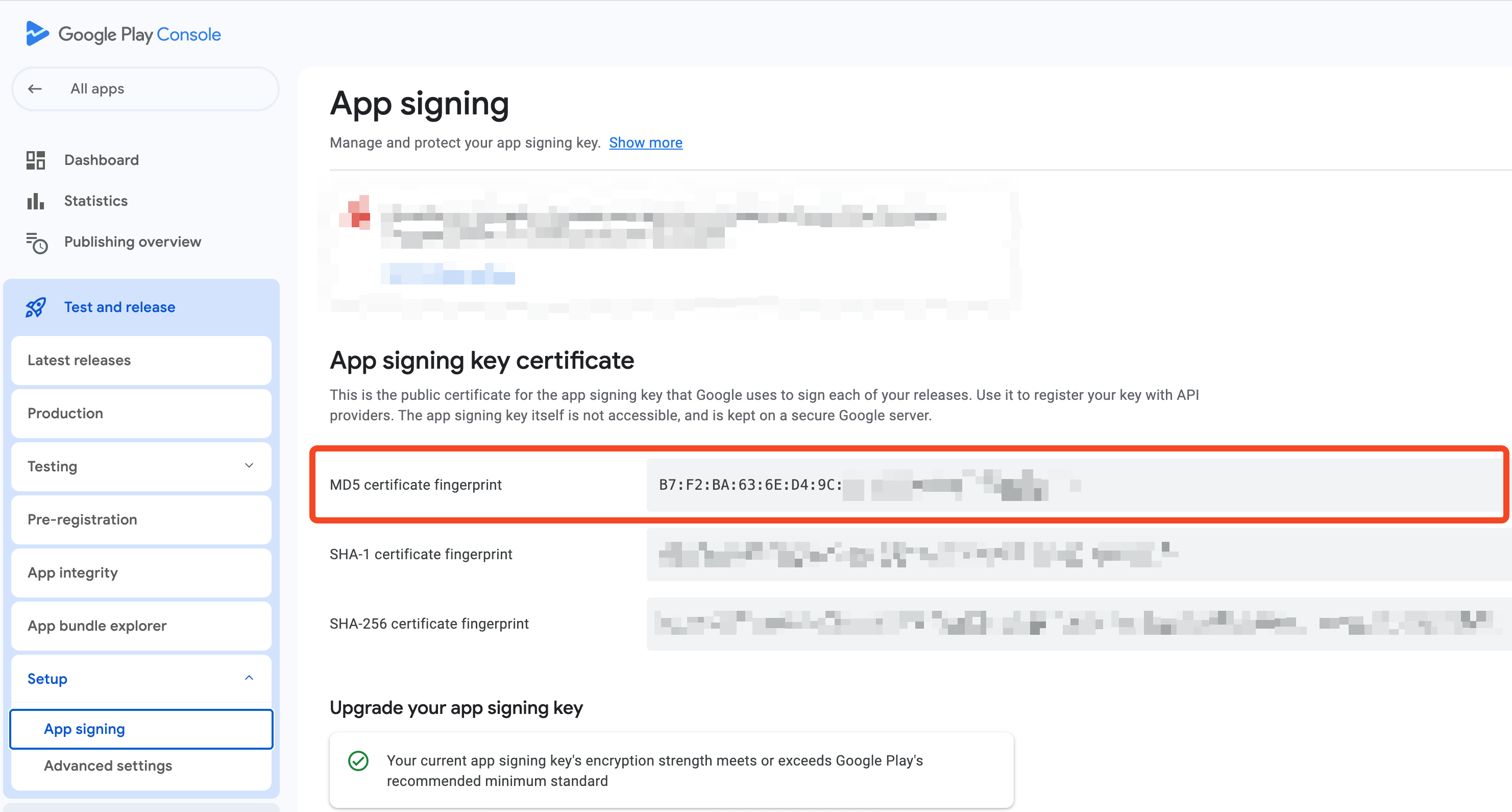
在哪里查看托管 keystore 的 MD5 指纹
请注意,Google Play Console 上显示的 MD5 指纹是以冒号分隔的大写十六进制字符串,而微信开放平台要求提供的是不带分隔符的小写十六进制字符串。
例如,假设您从 Google Play Console 获取的 MD5 指纹是 D4:1D:8C:D9:8F:00:B2:04:E9:80:09:98:EC:F8:42:7E,可以使用以下 shell 命令进行转换。
$ echo "D4:1D:8C:D9:8F:00:B2:04:E9:80:09:98:EC:F8:42:7E" | sed 's/://g' | tr 'A-Z' 'a-z'
d41d8cd98f00b204e9800998ecf8427e
输出结果 d41d8cd98f00b204e9800998ecf8427e 就是微信开放平台所要求的格式。
如果您使用自己的 keystore 生成应用的最终签名,可以使用以下 shell 命令输出 MD5 指纹。
keytool -exportcert -keystore "$STORE_FILE" -storepass "$STORE_PASSWORD" -alias "$KEY_ALIAS" -rfc | openssl x509 -noout -fingerprint -md5
其中
STORE_FILE是指向您机器上 keystore 文件的环境变量,例如./mykeystore.jks。STORE_PASSWORD是包含 keystore 密码的环境变量。KEY_ALIAS是指明要使用 keystore 中哪个 key 的环境变量。
为微信配置 Authany SDK
您需要执行 2 个操作:
- 在初始化 Authany SDK 时切换到
WebKitWebViewUIImplementation。 - 实现
WebKitWebViewUIImplementation的回调 / delegate。
切换到 WebKitWebViewUIImplementation
import Authgear

let uiImplementation = WKWebViewUIImplementation()
// Put the WeChat redirect URI you added in the Authgear portal here.
uiImplementation.wechatRedirectURI = URL(string: "com.myapp://authgear/open_wechat_app")!
// You need to implement the delegate to bridge between the WeChat SDK and the Authgear SDK.
uiImplementation.authgearDelegate = self

self.authgear = Authgear(
  clientId: "AUTHGEAR_CLIENT_ID",
  endpoint: "https://myapp.authanyid.com",
  uiImplementation: uiImplementation
)
WebKitWebViewUIImplementation impl = new WebKitWebViewUIImplementation();
impl.setWechatRedirectURI(Uri.parse("com.myapp://authgear/open_wechat_app"));
impl.setAuthgearDelegate(this);
boolean isSsoEnabled = false;
boolean isPreAuthenticatedURLEnabled = false;

this.mAuthgear = new Authgear(
  this.getApplicationContext(),
  "AUTHGEAR_CLIENT_ID",
  "https://myapp.authanyid.com",
  new TransientTokenStorage(),
  impl,
  isSsoEnabled,
  isPreAuthenticatedURLEnabled,
  null,
  null
);
import authgear, {
  WebKitWebViewUIImplementation,
} from '@authgear/react-native';

authgear.configure({
  clientID: "AUTHGEAR_CLIENT_ID",
  endpoint: "https://myapp.authanyid.com",
  uiImplementation: new WebKitWebViewUIImplementation({
    ios: {
      wechatRedirectURI: "com.myapp://authgear/open_wechat_app",
    },
    android: {
      wechatRedirectURI: "com.myapp://authgear/open_wechat_app",
    },
    // You need to implement this callback to bridge between the WeChat SDK and the Authgear SDK.
    sendWechatAuthRequest,
  }),
})
import 'package:flutter_authgear/flutter_authgear.dart';

var authgear = Authgear(
  clientID: "AUTHGEAR_CLIENT_ID",
  endpoint: "https://myapp.authanyid.com",
  uiImplementation: WebKitWebViewUIImplementation(
    options: WebKitWebViewUIImplementationOptions(
      ios: WebKitWebViewUIImplementationOptionsIOS(
        wechatRedirectURI: "com.myapp://authgear/open_wechat_app",
      ),
      android: WebKitWebViewUIImplementationOptionsAndroid(
        wechatRedirectURI: "com.myapp://authgear/open_wechat_app",
      ),
      // You need to implement this callback to bridge between the WeChat SDK and the Authgear SDK.
      sendWechatAuthRequest: sendWechatAuthRequest,
    ),
  ),
)
实现 WebKitWebViewUIImplementation 的回调 / delegate
说明
本节假设您已按照以下内容完成了微信 SDK 的集成:
具体来说,
- 在 iOS 上,您在
AppDelegate中实现了WXApiDelegate。 - 在 Android 上,您的
WXEntryActivity会发送一条广播,以state作为 Intent action。
在您的 AppDelegate.swift 中
import Authgear

@UIApplicationMain
class AppDelegate: UIResponder, UIApplicationDelegate, WXApiDelegate, AuthgearDelegate {
  // authgear is assumed to be initialised somewhere else.
  var authgear: Authgear!

  // Implements AuthgearDelegate
  func sendWechatAuthRequest(_ state: String) {
    // Open WeChat using the WeChat SDK.
    let req = SendAuthReq()
    req.scope = "snsapi_userinfo"
    req.state = state
    WXApi.send(req)
  }

  // Implements WXApiDelegate
  func onResp(_ resp: BaseResp) {
    guard let authResp = resp as? SendAuthResp else {
      return
    }

    let errCode = WXErrCode(rawValue: authResp.errCode)
    if errCode == WXSuccess {
      let state = authResp.state
      let code = authResp.code
      // Forward code to Authgear SDK.
      self.authgear?.wechatAuthCallback(code: code, state: state) { result in
        switch result {
        case .success():
          // The code was sent to Authgear successfully.
          // The end-user will proceed the login in the WebView.
          // You do not need to do anything here.
          break
        case let .failure(error):
          // Handle the error returned by the Authgear SDK properly to deliver good user experience.
        }
      }
    } else {
      // Handle the error returned by the WeChat SDK properly to deliver good user experience.
    }
  }
}
在您的 MainActivity.java 中
public class MainActivity extends AppCompatActivity implements AuthgearDelegate {
  private IWXAPI mWeChatAPI;
  // mAuthgear is assumed to be initialised somewhere else.
  private Authgear mAuthgear;

  @Override
  public void sendWechatAuthRequest(String state) {
      if (!this.mWeChatAPI.isWXAppInstalled()) {
        // Handle WeChat not installed.
        return;
      }

      Context ctx = this.getApplicationContext();

      IntentFilter intentFilter = new IntentFilter(state);
      BroadcastReceiver br;
      br = new BroadcastReceiver() {
        @Override
        public void onReceive(Context context, Intent intent) {
          String state_ = intent.getStringExtra("state");
          if (state_ != null && state_.equal(state)) {
            ctx.unregisterReceiver(br);

            String code = intent.getStringExtra("code");
            String error = intent.getStringExtra("error");
            if (code != null) {
              mAuthgear.wechatAuthCallback(code, state, new OnWechatAuthCallbackListener() {
                @Override
                public void onWechatAuthCallback() {
                  // No need to do anything here.
                }

                @Override
                public void onWechatAuthCallbackFailed(Throwable throwable) {
                  // Handle error.
                }
              });
            } else {
              // Handle error.
            }
          }
        }
      }
      ContextCompat.registerReceiver(ctx, br, intentFilter, ContextCompat.RECEIVER_NOT_EXPORTED);

      SendAuth.Req req = new SendAuth.Req();
      req.scope = "snsapi_userinfo";
      req.state = state;
      this.mWeChatAPI.sendReq(req);
  }
}
在您的 React Native TypeScript 代码中
import {
  NativeModules,
} from "react-native";
import authgear from '@authgear/react-native';

// This is the callback you pass to WebKitWebViewUIImplementation.
async function sendWechatAuthRequest(state: string) {
  // MyWeChatModule is the Native Module you need to implement yourselves to bridge
  // between the WeChat SDK and the Authgear SDK.
  const { code } = await NativeModules.MyWeChatModule.sendWechatAuthRequest(state);
  await authgear.wechatAuthCallback(code, state);
}
在您的 iOS Native Module MyWeChatModule.h 中
#import <React/RCTBridgeModule.h>

static NSString *const kMyWeChatModuleNotification = @"MyWeChatModuleNotification";

@interface MyWeChatModule : NSObject <RCTBridgeModule>
@end
在您的 iOS Native Module MyWeChatModule.m 中
#import "MyWeChatModule.h"
#import <React/RCTUtils.h>
#import <WXApi.h>

@interface MyWeChatModule()
@property (nonatomic, strong) RCTPromiseResolveBlock sendWechatAuthResolve;
@property (nonatomic, strong) RCTPromiseRejectBlock sendWechatAuthReject;
@end

@implementation MyWeChatModule

RCT_EXPORT_MODULE(MyWeChatModule);

- (instancetype)init
{
  if ((self = [super init])) {
    // Listen to the notification posted by your WXApiDelegate.
    [[NSNotificationCenter defaultCenter] addObserver:self
                                             selector:@selector(handleWechatAuthResult:)
                                                 name:kMyWeChatModuleNotification
                                               object:nil];
  }
  return self;
}

RCT_EXPORT_METHOD(sendWechatAuthRequest:(NSString *)state
                                resolve:(RCTPromiseResolveBlock)resolve
                                 reject:(RCTPromiseRejectBlock)reject)
{
  self.sendWechatAuthResolve = resolve;
  self.sendWechatAuthReject = reject;

  dispatch_async(dispatch_get_main_queue(), ^{
    SendAuthReq* req = [[SendAuthReq alloc] init];
    req.scope = @"snsapi_userinfo";
    req.state = state;
    [WXApi sendReq:req completion:nil];
  });
}

- (void)handleWechatAuthResult:(NSNotification *)notification
{
  if (notification.userInfo[@"code"]) {
    self.sendWechatAuthResolve(notification.userInfo);
  } else {
    NSString *error = notification.userInfo[@"error"];
    self.sendWechatAuthReject(RCTErrorUnspecified, error, error);
  }
  [self cleanup];
}

- (void)cleanup
{
    self.sendWechatAuthResolve = nil;
    self.sendWechatAuthReject = nil;
}

@end
在您的 WXApiDelegate 中
-(void) onResp:(BaseResp*)resp
{
  if ([resp isKindOfClass:[SendAuthResp class]]) {
    SendAuthResp *sendAuthResp = (SendAuthResp*)resp;
    NSDictionary<NSString *, id> *payload;
    if (sendAuthResp.errCode == WXSuccess) {
      payload = @{
        @"code": sendAuthResp.code,
        @"state": sendAuthResp.state,
      };
    } else {
      NSString *error;
      switch (resp.errCode) {
        case WXErrCodeUserCancel:
          error = @"errcode_cancel";
          break;
        case WXErrCodeAuthDeny:
          error = @"errcode_deny";
          break;
        case WXErrCodeUnsupport:
          error = @"errcode_unsupported";
          break;
        default:
          error = @"errcode_unknown";
          break;
      }
      payload = @{
        @"error": error,
      };
    }
    // Send the notification to your MyWeChatModule.
    [[NSNotificationCenter defaultCenter] postNotificationName:kMyWeChatModuleNotification
                                                        object:nil
                                                      userInfo:payload];
  }
}
在您的 Android Native Module MyWeChatModule 中
import android.content.BroadcastReceiver;
import android.content.Context;
import android.content.IntentFilter;
import androidx.core.content.ContextCompat;
import com.facebook.react.bridge.ReactContextBaseJavaModule;
import com.tencent.mm.opensdk.openapi.IWXAPI;
import com.tencent.mm.opensdk.openapi.WXAPIFactory;

public class MyWeChatModule extends ReactContextBaseJavaModule {
    private IWXAPI wechatAPI;

    WechatAuthModule(ReactApplicationContext context) {
        super(context);

        wechatAPI = WXAPIFactory.createWXAPI(context, "wxYOUR_WECHAT_APPID", true);
        wechatAPI.registerApp("wxYOUR_WECHAT_APPID");
    }

    @Override
    public String getName() {
        return "MyWeChatModule";
    }

    @ReactMethod
    public void sendWechatAuthRequest(String state, Promise promise) {
        if (!wechatAPI.isWXAppInstalled()) {
            promise.reject(new Exception("You have not installed the WeChat client app"));
            return;
        }

        Context ctx = this.getReactApplicationContext();

        IntentFilter intentFilter = new IntentFilter(state);
        BroadcastReceiver br;
        br = new BroadcastReceiver() {
            @Override
            public void onReceive(Context context, Intent intent) {
                String state_ = intent.getStringExtra("state");
                if (state_ != null && state_.equal(state)) {
                    ctx.unregisterReceiver(br);

                    String code = intent.getStringExtra("code");
                    String error = intent.getStringExtra("error");
                    if (code != null) {
                        WritableMap result = new WritableNativeMap();
                        result.putString("code", code);
                        result.putString("state", state);
                        promise.resolve(result);
                    } else {
                        promise.reject(error, error);
                    }
                }
            }
        }
        ContextCompat.registerReceiver(ctx, br, intentFilter, ContextCompat.RECEIVER_NOT_EXPORTED);

        SendAuth.Req req = new SendAuth.Req();
        req.scope = "snsapi_userinfo";
        req.state = state;
        wechatAPI.sendReq(req);
    }
}
在您的 Flutter 代码中
import 'package:flutter/services.dart';
import 'package:flutter_authgear/flutter_authgear.dart';

// authgear is assumed to be initialised somewhere else.
var authgear;

const _nativeMethodChannel = MethodChannel("MyWeChatMethodChannel");

// This is the callback you pass to WebKitWebViewUIImplementation.
Future<void> sendWechatAuthRequest(String state) async {
  try {
    final code = await _nativeMethodChannel.invokeMethod("sendWechatAuthRequest", {
      "state": state,
    });
    await authgear.wechatAuthCallback(state: state, code: code);
  } on PlatformException catch (e) {
    print("exception: $e");
  }
}
在您的 AppDelegate.swift 中
import Flutter

@main
@objc class AppDelegate: FlutterAppDelegate, WXApiDelegate {

  private var wechat = [String: FlutterResult]()

  override func application(
    _ application: UIApplication,
    didFinishLaunchingWithOptions launchOptions: [UIApplication.LaunchOptionsKey: Any]?
  ) -> Bool {
    let controller = window?.rootViewController as! FlutterViewController
    let channel = FlutterMethodChannel(name: "MyWeChatMethodChannel", binaryMessenger: controller.binaryMessenger)
    channel.setMethodCallHandler {
      (call: FlutterMethodCall, result: @escaping FlutterResult) -> Void in
      let arguments = call.arguments as! Dictionary<String, AnyObject>
      let state = arguments["state"] as! String
      self.wechat[state] = result
      let req = SendAuthReq()
      req.scope = "snsapi_userinfo"
      req.state = state
      WXApi.send(req)
    }

    GeneratedPluginRegistrant.register(with: self)
    return super.application(application, didFinishLaunchingWithOptions: launchOptions)
  }

  override func application(_ app: UIApplication, open url: URL, options: [UIApplication.OpenURLOptionsKey : Any] = [:]) -> Bool {
      WXApi.handleOpen(url, delegate: self)
      return super.application(app, open: url, options: options)
  }

  override func application(_ application: UIApplication, open url: URL, sourceApplication: String?, annotation: Any) -> Bool {
      WXApi.handleOpen(url, delegate: self)
      return super.application(application, open: url, sourceApplication: sourceApplication, annotation: annotation)
  }

  override func application(_ application: UIApplication, continue userActivity: NSUserActivity, restorationHandler: @escaping ([UIUserActivityRestoring]?) -> Void) -> Bool {
    WXApi.handleOpenUniversalLink(userActivity, delegate: self)
    return super.application(application, continue: userActivity, restorationHandler: restorationHandler)
  }

  @objc
  func onReq(_ req: BaseReq) {
  }

  @objc
  func onResp(_ resp: BaseResp) {
    guard let authResp = resp as? SendAuthResp else {
      return
    }

    guard let state = authResp.state else {
      return
    }

    guard let result = wechat.removeValue(forKey: state) else {
      return
    }

    var error: String
    switch WXErrCode(rawValue: authResp.errCode) {
    case WXErrCodeUserCancel:
      error = "errcode_cancel"
    case WXErrCodeAuthDeny:
      error = "errcode_deny"
    case WXErrCodeUnsupport:
      error = "errcode_unsupported"
    default:
      error = "errcode_unknown"
    }

    switch WXErrCode(rawValue: authResp.errCode) {
    case WXSuccess:
      let code = authResp.code
      result(code)
    default:
      result(FlutterError(code: error, message: error, details: nil))
    }
  }
}
在您的 MainActivity.kt 中
class MainActivity: FlutterFragmentActivity() {

  private var api: IWXAPI? = null

  override fun configureFlutterEngine(flutterEngine: FlutterEngine) {
    super.configureFlutterEngine(flutterEngine)

    MethodChannel(flutterEngine.dartExecutor.binaryMessenger, "MyWeChatMethodChannel").setMethodCallHandler { call, result ->
        handleMethodCall(call, result)
    }
  }

  private fun handleMethodCall(call: MethodCall, result: MethodChannel.Result) {
    val api = api!!
    if (!api.isWXAppInstalled) {
        result.error("errcode_not_installed", "errcode_not_installed", null)
        return
    }

    val state = call.argument<String>("state")!!
    val req = SendAuth.Req()
    req.scope = "snsapi_userinfo"
    req.state = state

    var broadcastReceiver: BroadcastReceiver?
    broadcastReceiver = object : BroadcastReceiver() {
      override fun onReceive(context: Context?, intent: Intent?) {
        val state_ = intent.getStringExtra("state")
        if (state_ == state) {
          this@MainActivity.applicationContext.unregisterReceiver(broadcastReceiver)

          val code = intent.getStringExtra("code")
          val error = intent.getStringExtra("error")
          if (code != null) {
            result.success(code)
          } else {
            result.error(error, error, nil)
          }
        }
      }
    }
    val intentFilter = IntentFilter(state)
    ContextCompat.registerReceiver(this.applicationContext, broadcastReceiver, intentFilter, ContextCompat.RECEIVER_NOT_EXPORTED)
    api.sendReq(req)
  }
}
附录:在微信开放平台创建移动应用
前提条件:注册应用需要一个微信账号。
在平台上创建应用需要以下信息,请在创建应用前准备好:
基本信息
| Field | 英文释义 | 说明 |
|---|---|---|
| 移动应用名称 | Mobile app name | 用户登录时向其展示的应用名称 |
| 英文名称 | Mobile app name in English | 向英文用户登录时展示的应用名称 |
| 移动应用简介 | Mobile app description | 供审核人员了解应用情况的描述 |
| 英文简介 | Mobile app description in English | 可选字段 |
| 应用官网 | Official website of the mobile app | 该网页应展示应用介绍,并提供在各应用商店下载该应用的链接 |
| 移动应用图片 | App Icon | 需要提供 28x28 和 108x108 两种尺寸的图标 |
| 应用市场 | Is the app released on any app stores for Chinese users? | 可选择: |
| 应用类目 | App category | 从平台定义的类目列表中,选择最符合您应用的类目 |
| 应用运行流程图 | Images of app flow | 展示应用运作方式的流程图或截图 |
| 申请/修改应用说明 | Application details | 申请原因、测试账号及测试说明。 |
| 管理员身份设置 | Set Admin | 使用微信 App 扫描二维码,以验证应用管理员身份。 |
应用配置
iOS
- Bundle ID
- 测试 Bundle (Testing Bundle ID)
- Universal Links
- 备用 Universal Links (Backup Universal Links)
Android
- 应用包名 (Package name)
- 应用签名 (App Signature)