Custom Authentication Flow
Authany lets you define exactly how users sign up and log in. Instead of using the default UI, you can configure a custom authentication flow — a sequence of steps that controls which identifiers you accept, how you verify them, and how users authenticate.
Configure flows in the Authany portal under Portal > Advanced > Edit Config, in the authentication_flow section of the YAML.
Key concepts
Before reading the examples, here are the building blocks you'll see throughout the YAML:
| Term | What it does |
|---|---|
signup_flows |
Defines steps for registering a new user |
login_flows |
Defines steps for authenticating a returning user |
signup_login_flows |
A single flow that detects whether the user is new or returning, then routes to the appropriate signup_flow or login_flow |
type: identify |
A step that asks the user for an identifier (email, phone, etc.) |
type: verify |
A step that confirms the user owns the identifier (e.g. via OTP) |
type: authenticate |
A step that authenticates the user with a registered credential |
type: create_authenticator |
A step that registers a new authenticator for the user |
one_of |
Lists the allowed options for a step. Required even when there is only one option. |
target_step |
Links a verify or create_authenticator step back to the identify step that collected the credential |
Prerequisites
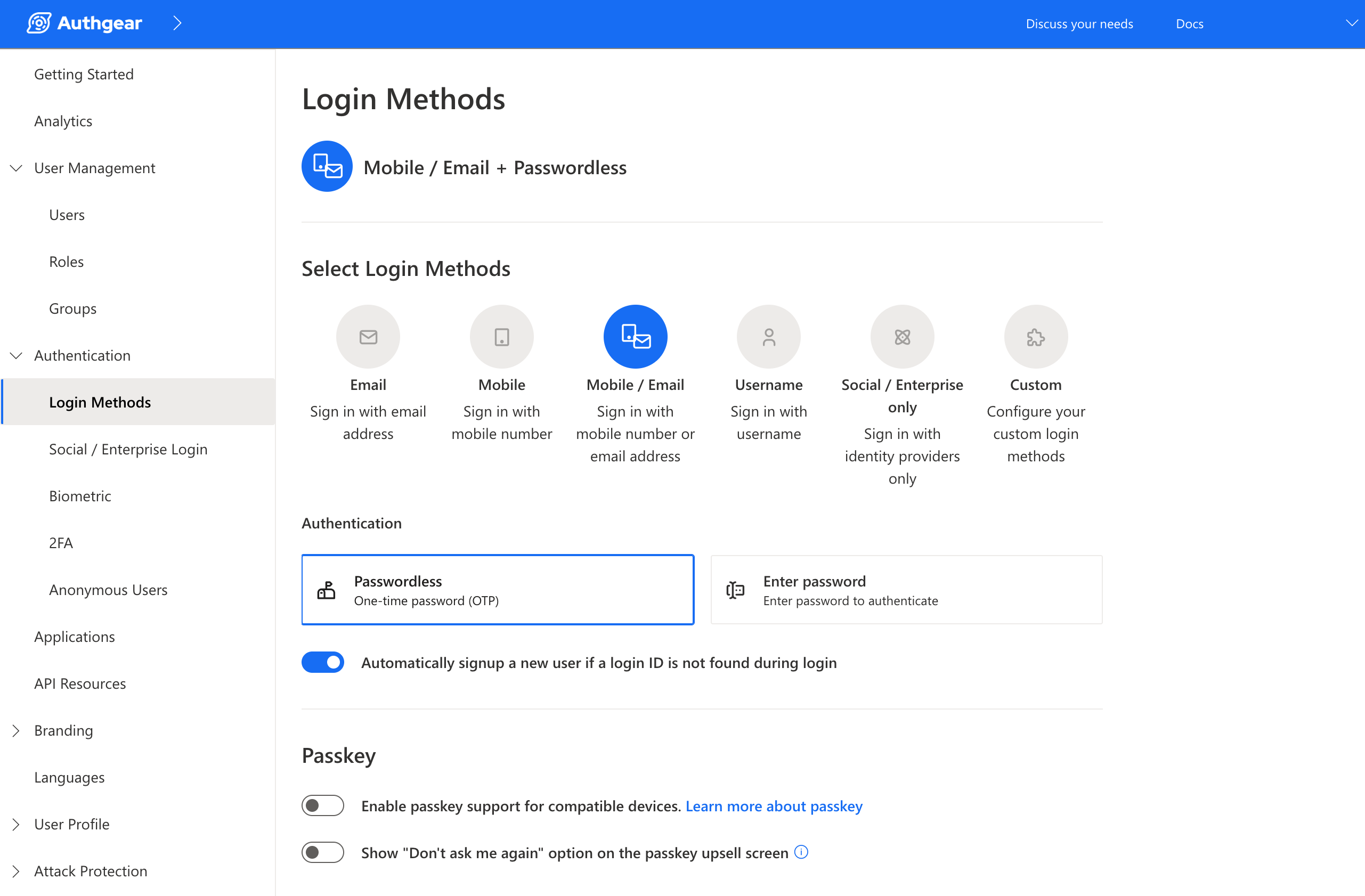
The examples on this page use OTP-based passwordless authentication over email and SMS. Before adding the YAML config, enable the right login method in the portal:
- Go to Authentication > Login Methods
- Select Mobile / Email
- Under Authentication, select Passwordless
If you use a different login method (e.g. password-based), the primary_oob_otp_email and primary_oob_otp_sms authenticators in the examples will not work — adjust the authentication values to match your chosen method.
Example: Signup requiring both email and phone
By default, when both email and phone are enabled, users can choose one identifier to sign up with — not both. This example changes that: it requires users to provide and verify both an email address and a phone number during signup. After signup, they can log in with either.
The signup flow has two sequential steps: setup_email, then setup_phone.
Each step collects one identifier and immediately verifies it with a one-time passcode. The create_authenticator step then registers that identifier as a login method, so the user can use it to log in later.
target_step is required here because the verify and create_authenticator steps are nested inside an identify step — they need to explicitly reference the parent step that collected the credential.
Warning
This config only defines a signup_flow. It does not include login steps. Disable "Automatically sign up a new user if a login ID is not found during login" in the portal, or returning users may trigger a signup instead of a login.
Example: Combined signup and login, with both identifiers collected on signup
signup_login_flows handles new and returning users in one flow. The user enters an identifier (email or phone), and Authany checks whether an account exists:
- Account found → routes to
login_flow - No account found → routes to
signup_flow
This means your UI only needs one screen — no separate "Log in" and "Sign up" buttons required.
The example below combines this with the two-identifier requirement from the previous example. Users log in with whichever identifier they have. New users must verify both a phone number and an email during signup, so they can use either to log in in the future.
authentication_flow:
  signup_login_flows:
  - name: default
    steps:
    - type: identify
      one_of:
      - identification: phone
        login_flow: default
        signup_flow: default
      - identification: email
        login_flow: default
        signup_flow: default

  login_flows:
  - name: default
    steps:
    - type: identify
      one_of:
      - identification: phone
        steps:
        - type: authenticate
          one_of:
          - authentication: primary_oob_otp_sms
      - identification: email
        steps:
        - type: authenticate
          one_of:
          - authentication: primary_oob_otp_email

  signup_flows:
  - name: default
    steps:
    - type: identify
      name: setup_id1
      one_of:
      - identification: phone
        steps:
        - type: verify
          target_step: setup_id1
        - type: identify
          name: setup_id2
          one_of:
          - identification: email
            steps:
            - type: verify
              target_step: setup_id2
      - identification: email
        steps:
        - type: verify
          target_step: setup_id1
        - type: identify
          name: setup_id3
          one_of:
          - identification: phone
            steps:
            - type: verify
              target_step: setup_id3
    - type: create_authenticator
      one_of:
      - authentication: primary_oob_otp_sms
      - authentication: primary_oob_otp_email
How each part works
signup_login_flows
The user picks an identifier — phone or email. Both options point to the same login_flow: default and signup_flow: default. Authany looks up the identifier and routes the user automatically.
login_flows
For returning users. After identifying themselves, the user receives a one-time passcode — by SMS if they entered a phone number, or by email if they entered an email address.
signup_flows
For new users. The flow collects and verifies both identifiers, regardless of which one the user entered first.
- User starts with phone (
setup_id1: phone): Authany verifies the phone number, then asks for an email address (setup_id2) and verifies that too. - User starts with email (
setup_id1: email): Authany verifies the email address, then asks for a phone number (setup_id3) and verifies that too.
Once both identifiers are verified, the create_authenticator step registers the OTP method the user will use to authenticate on future logins.
Note
setup_id2 and setup_id3 are separate named steps because the second identifier collected depends on which one the user started with. Each path needs its own named step so target_step can reference the right one.
Warning
When using signup_login_flows, disable "Automatically sign up a new user if a login ID is not found during login" in the portal. That setting conflicts with the routing logic in signup_login_flows.
Further reading
- Overview of Authentication Flow API — use the API to build a fully custom login UI
- Authentication Flow API specification — full reference for all flow types, step types, and options